

SDK developer guide:
Embodied RealEye Minimum Module 1. Overview
The minimum functional module ACT of the Embodied RealEye product has completed standardized SDK interface encapsulation, enabling unified interface calls for the module's capabilities.
2. Function Introduction
Embodied RealEye is an action understanding and learning system for the robotics field, supporting the learning of complex tasks such as grasping and manipulation through demonstration, achieving an intelligent demonstration capability that integrates "perception, understanding, and execution".
Function Parameters
- Operation success rate: 80%
- Model parameters: 89M
3. Preparation
Basic Environment Preparation
| Item | Version |
|---|---|
| Operating system | ubuntu20.04 |
| Architecture | x86 |
| GPU driver | 535.183.01 |
| Python | 3.10 |
| pip | 25.1 |
Python Environment Preparation
| Package | Version |
|---|---|
| cuda | 12.4 |
| cudnn | 8.0 |
| torch | 2.7.1 |
| torchvision | 0.22.1 |
| accelerate | 1.13.0 |
Make sure the basic environment is installed
Install the Nvidia driver. For details, please refer to Install Nvidia GPU driver
Install the conda package management tool and the python environment. For details, please refer to Install Conda and Python environment
Build a python environment
Create the conda virtual environment
bashconda create -n [conda_env_name] python==3.10 -yActivate the conda virtual environment
bashconda activate [conda_env_name]View the python version
bashpython -VView the pip version
bashpip -VUpdate pip to the latest version
bashpip install -U pipCode access
Get the latest code in GitHub: Embodied RealEye Minimum Module.
Install third-party package dependencies for the python environment
Install the lerobot module from source
bashcd lerobot pip install -e .Install ffmpeg
bashconda install ffmpeg -c conda-forge -yInstall accelerate
bashpip install accelerate
Hardware Preparation
Basic Parameters
| Hardware | Specification |
|---|---|
| Robotic arm | RM65-B-V |
| Camera | Wide‑angle camera (hx200) |
| GPU | 3060Ti or higher |
| Gripper | Two‑finger gripper (ZhiXing 90D) |
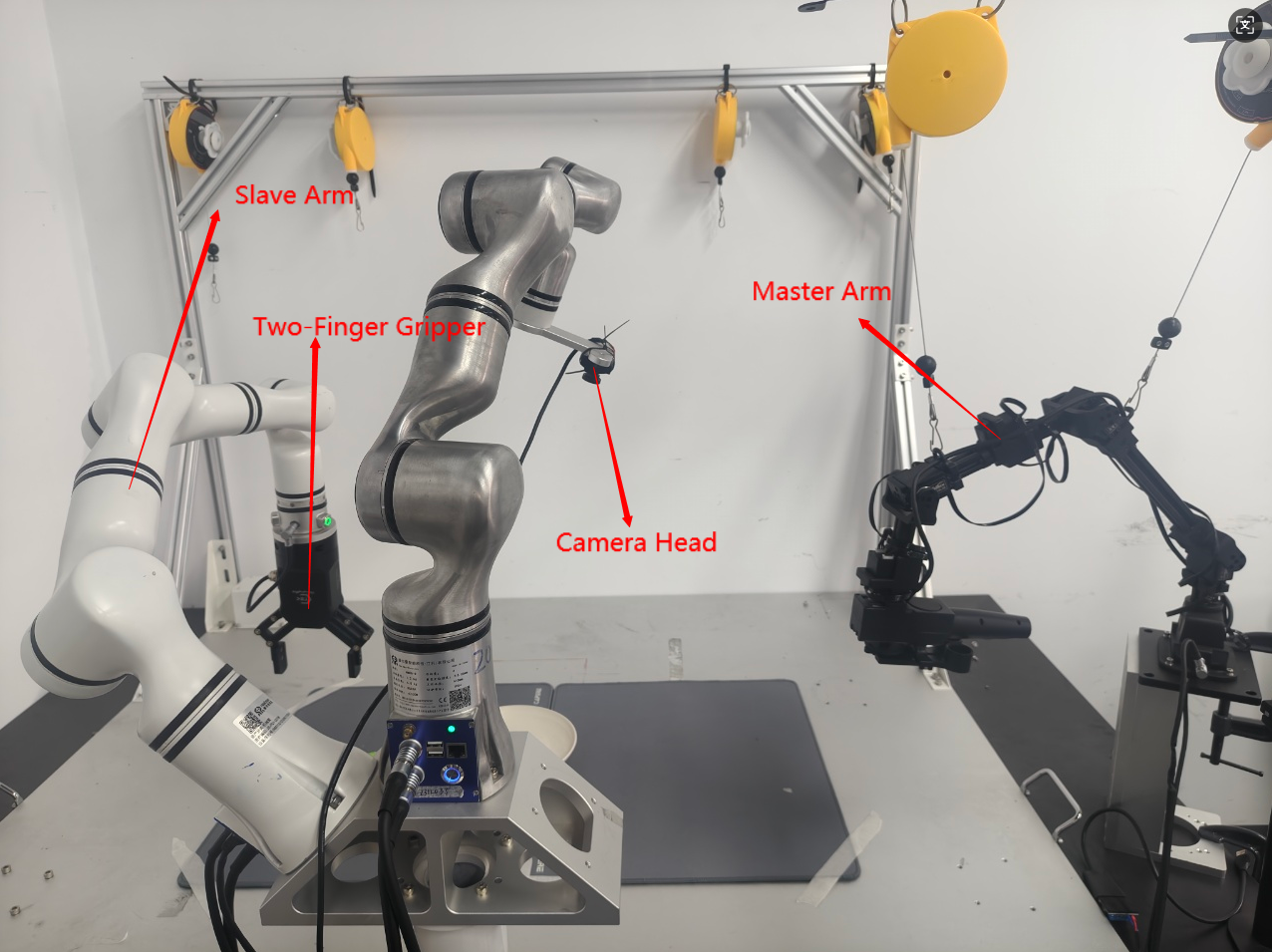
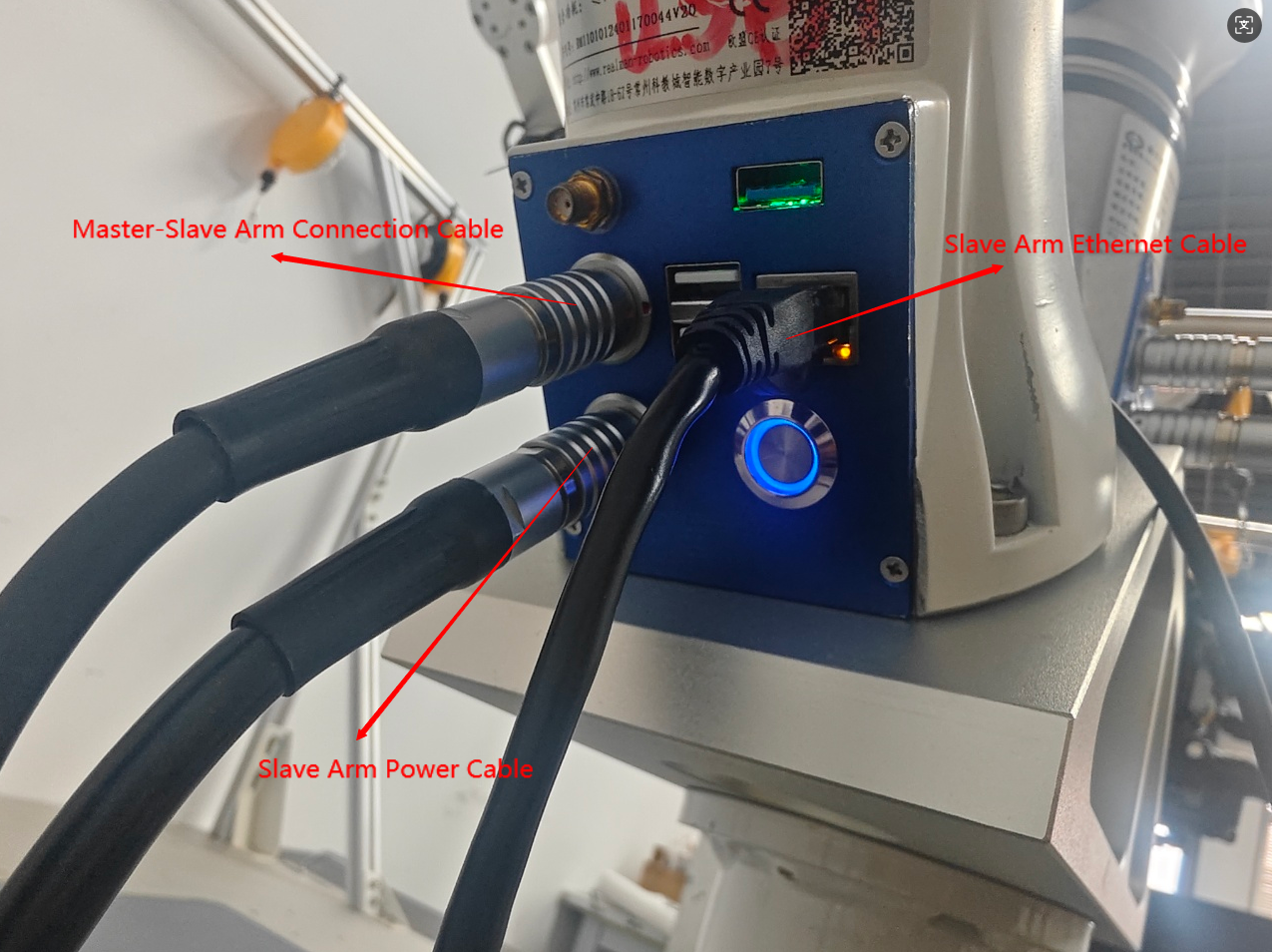
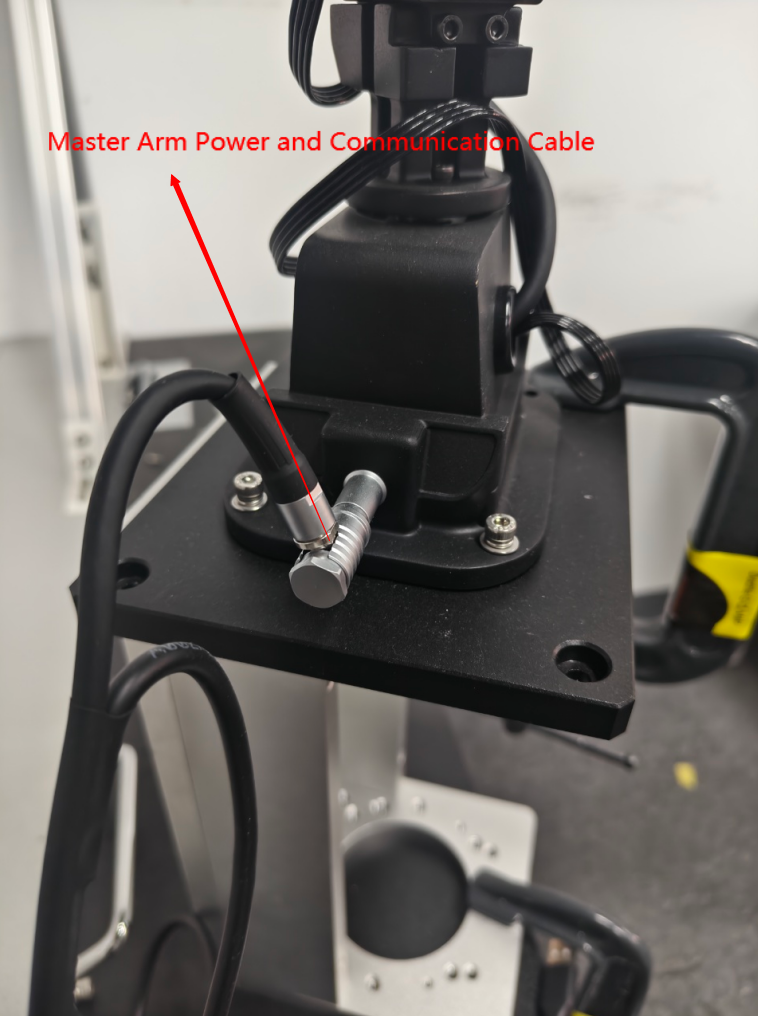
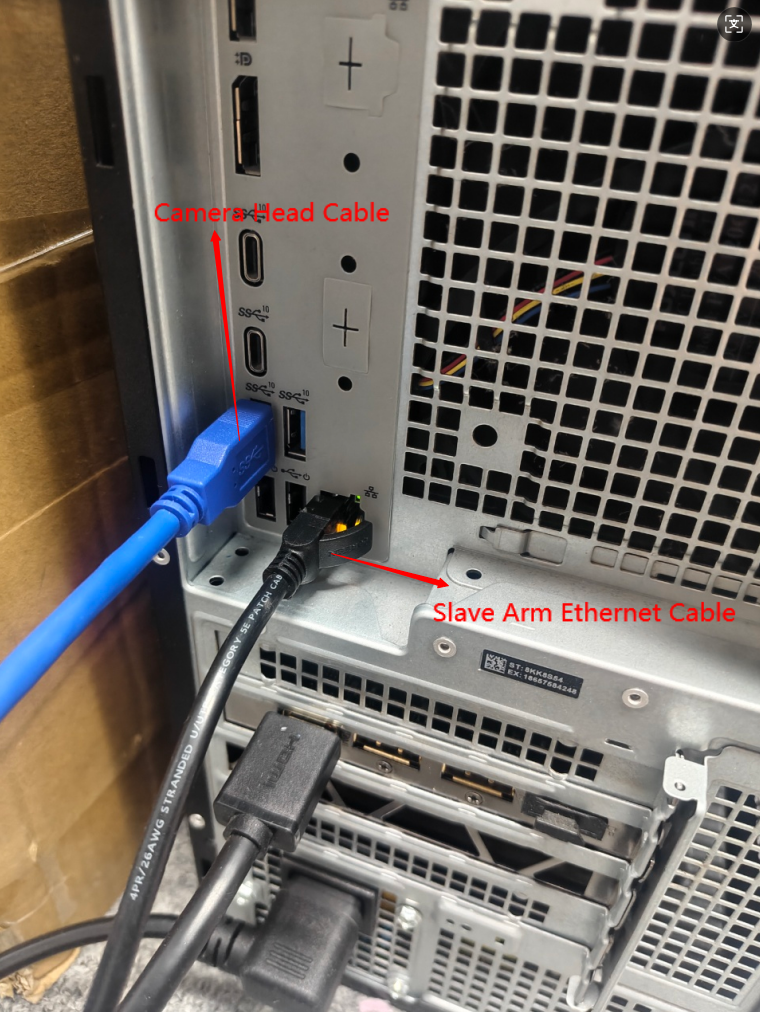
Hardware Wiring and Connection Diagram
Hardware Layout Diagram
Slave Arm (Robotic Arm) Wiring
Master Arm Wiring
Computer Wiring Diagram
4. Quick Start Example
Confirm Camera Port Number
# Execute in terminal
python SDK/find_cameras.py
Open lerobot/outputs_camera to view the corresponding camera view and port number.
The image name is the port number, e.g.,:
opencv__dev_video0.png
type: opencv
index_or_path: 0
Data Collection
from SDK.record import record_rm65_single_api

if __name__ == "__main__":
    record_rm65_single_api(
        ip="192.168.1.18",          # Robotic arm IP
        port=8080,                   # Robotic arm port number
        cameras={
            "head": {"type": "opencv", "index_or_path": 0, "width": 640, "height": 480, "fps": 30},  # Fill in parameters according to the execution result of find_cameras.py
        },
        dataset_root="/home/xxx/lerobot/data/xxx",            # Embodied data storage path
        dataset_repo_id="lerobot/data",                        # Data ID
        dataset_single_task="grab the toy",                    # Task description (modify to your own task)
        dataset_num_episodes=120,                              # Total number of episodes: collect 120 episodes of embodied data
        dataset_episode_time_s=600,                            # Duration per episode: maximum collection time per episode (in seconds), default 600 seconds / 10 minutes
        dataset_reset_time_s=1,                                 # Interval between episodes: waiting time between two consecutive episodes (in seconds), default 1 second
        resume=False,                                           # Collection mode: False = fresh collection (do not resume), True = continue from last interruption
        display_data=True,                                      # Visualize the data collection interface
    )
INFO
LeRobot Data Collection Operation Rules:
After running the collection program, press the left arrow key → to re‑collect the current episode.
Press the right arrow key → to save the current episode. After saving, press Enter to trigger the collection of the next episode.
Press ESC and then Enter → to exit the collection process and save all collected data.
Model Training
from SDK.train_act import train_api


if __name__ == "__main__":
    train_api(
        dataset_root="/home/xxx/data/xxx",          # Path to embodied data
        output_dir="outputs/train/xxx",              # Path to save model weights
        batch_size=48,                                # Training batch size
        steps=60000,                                  # Total training steps
        save_freq=10000,                              # Frequency of saving model weights, here saved every 10000 steps
    )
Model Inference
from inference_act import inference_rm65_single_api


if __name__ == "__main__":
    inference_rm65_single_api(
        ip="192.168.1.18",                             # IP of the robotic arm to be inferred
        port=8080,                                      # Port number of the robotic arm to be inferred
        cameras={
            "head": {"type": "opencv", "index_or_path": 0, "width": 640, "height": 480, "fps": 30},  # Camera type and name should be consistent with those in data collection
        },
policy_path="/home/xxx/lerobot/SDK/outputs/train/xxx/checkpoints/060000/pretrained_model",  # Path to the trained weights, modify as needed
        dataset_single_task="grab the toy",             # Task description (consistent with data collection)
    )