

Delivery & Operations:
Deployment and Acceptance Danger
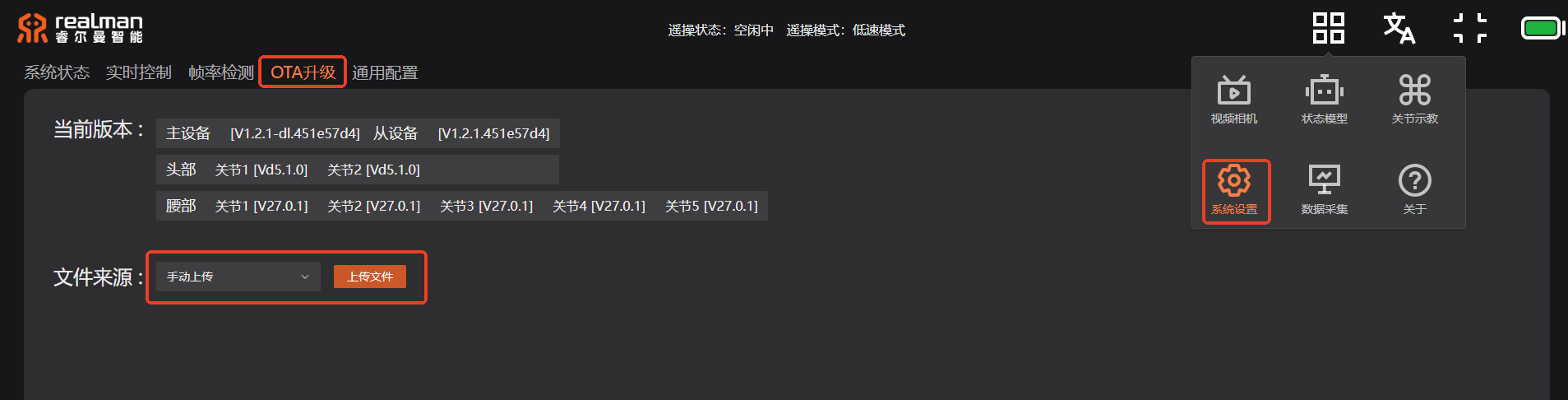
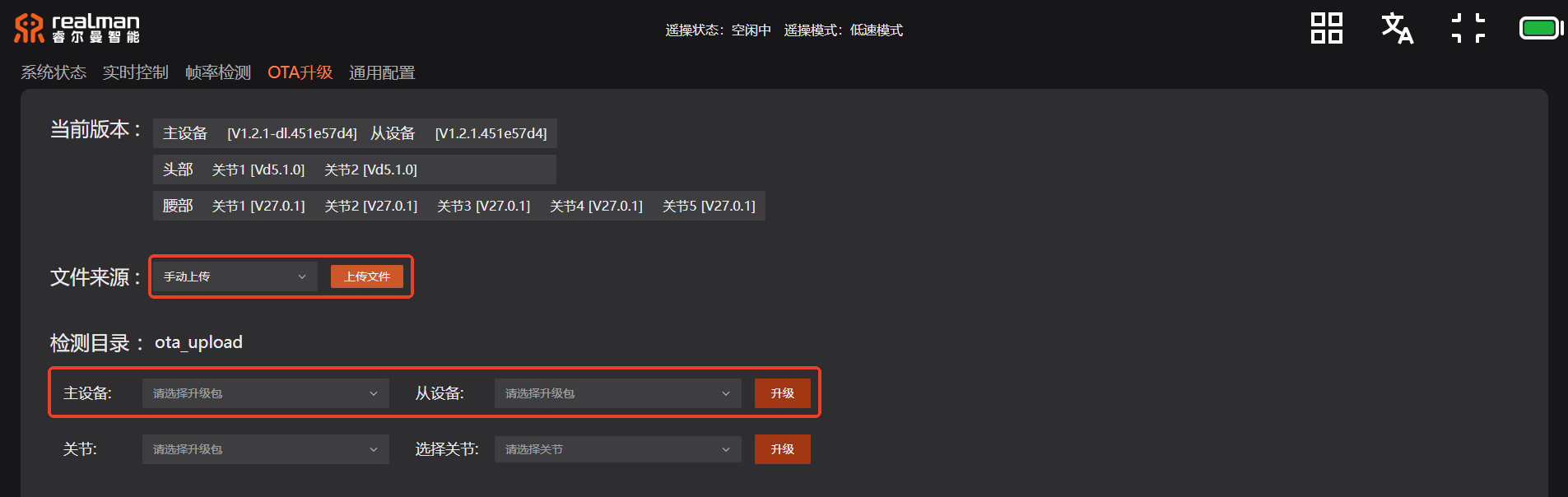
OTA updates are classified as High-Risk Operations. They may be initiated ONLY after package details, rollback procedures, power continuity, and on-site explicit authorization are completely verified.
Delivery Package
The examples/ scripts referenced on this page are obtained through the delivery package provided via official delivery channels; use the delivery package version matching your software version. The paths shown in this document are for illustrating script structure only.
Deployment Pathways
Select the preferred deployment pathway based on on-site development environments and hardware conditions in order of priority:
| Customer Environment | Preferred Pathway | Admission Criteria | Fallback Pathway |
|---|---|---|---|
| On-Robot Host | ROS 2 On-Host Nodes | Ubuntu 22.04 Humble, custom messages, permissions, and resource budget verified | Manual execution via SSH or offline file closed-loop |
| Ubuntu 22.04 / Humble Dev PC | Cross-Machine ROS 2 | Domain ID, RMW/message compatibility, and DDS reachability verified | Deploy directly on robot host |
| Non-ROS Platform | Loopback HTTP Bridge + SSH Tunnel | Valid API token, single-instance enforcement, logging, and rollback verified | SSH/SFTP + offline MCAP package |
| macOS / Windows | REST, SSH, Controlled HTTP Bridge, Offline MCAP | No assumption of local native ROS 2 setup | Ubuntu Gateway PC |
Production Acceptance Gateways
Danger
Acceptance steps must strictly follow the sequential order below layer by layer. Immediately HALT all deployment activities if any single layer fails validation.
Basic Information Verification: Validate robot model, hardware/software build versions, and delivery package SHA-256 hashes.
Interface Closed-Loop Validation: Verify read-only closed-loop connectivity for REST API, SSH, ROS Topics, system status, and battery state.
Functional Verification: Validate all active control, data recording, and communication bridge capabilities.
Business Data Closed-Loop: Verify unique run ID tracking, data retrieval workflows, MCAP timestamps, and Topic completeness.
Note
The data recording delivery demo may proceed to the next layer ONLY when
report.json.status == "PASS". If status is FAIL or execution is incomplete, remote data MUST be retained, and the delivery process terminated immediately.Security & Access Control: Validate rejection of invalid tokens, loopback/ACL enforcement, single-control ownership, and log data sanitization.
Exception Handling & Rollback: Verify fault recovery workflows, credential rotation protocols, and system rollback capabilities.
Performance Baseline: Collect system performance metric baselines across at least 3 equal-duration time windows under real customer production workloads.
Recommendation
Deployment of systemd services must take place ONLY after all manual execution tests have successfully passed.
- Deployment Workflow: Review unit file template → Back up existing service units → Validate via
systemd-analyze verify→ Execute manualstart→ Complete functional, authentication, restart, and rollback acceptance → Evaluate whether toenable. - Executing a single-step
enable --nowcommand is strictly prohibited.
Logging and Delivery Integrity
Logging Rules & Data Delivery Requirements:
- Delivery logs must include time-zone-aware timestamps, robot model and hardware/software versions, unique run ID, request types, exit/business codes, state readbacks, file SHA-256 hashes, and recovery status results.
- Including SSH passwords, Bearer tokens, Authorization headers, private keys, or full un-sanitized customer business data in logs is strictly prohibited.
- The data recording delivery closed-loop must retain the exact recording directory,
ros2_bag_info.txt,delivery_manifest.json,report.json, andreport.md. Reports must explicitly declare that remote data remains retained, binding the recording directory, evidence directory, and the identical run ID together.
Log Localization and Analysis:
The read-only startup sequence of the standard baseline system is as follows (for log localization and blast radius assessment only; NOT to be used as a customer-replicable systemd template):
realman.service→/home/realman/workspace/start.sh→ Wait for video devices (~40s) → Background executerm_data_collect/data_collect_start.sh→ Foreground executerm_robot_ws/run.sh→rm_robot_bringup_master.launch.py.
Note
realman.service is currently configured as enabled/active with Restart=no. Therefore, a service status of "active" merely indicates that the main process is running; it does NOT guarantee that all child nodes, sensors, or platform functions are operating normally. In the event of an unexpected process exit, automatic recovery by systemd must NOT be assumed.
Read-only customer diagnostic commands:
systemctl is-enabled realman.service
systemctl is-active realman.service
systemctl --failed --no-pager
systemctl show realman.service \
-p MainPID -p ActiveEnterTimestamp -p ExecStart -p Result| Log Path / Storage Location | Content Scope | Boundary & Usage Constraints |
|---|---|---|
journalctl -u realman.service | Full robot startup, Web sub-processes, and systemd context | Read exclusively within precise time ranges; credentials in log text must NEVER be used |
/tmp/robot_run.log, /tmp/rm_robot_logs/ | Robot bringup, camera encoding, hardware connections, and ROS 2 node logs | Logs may grow rapidly; attach logs restricted strictly to the incident time window |
/tmp/startup.log, /tmp/rm_data_collect_start.log | Platform startup sequence and node process PIDs | For service discovery only; do NOT terminate processes based directly on recorded PIDs |
/tmp/rm_data_collect_logs/, /tmp/rm_func_*.log | Platform errors, tracing, recording, trigger, and upload node logs | May contain task identifiers and system paths; sanitize thoroughly prior to submission |
It is recommended to run robot_health_snapshot.sh first, then inspect targeted logs based on explicit WARN/FAIL findings in the generated report. Using tail -f to occupy support terminals for extended periods, executing vague process kills, or restarting the entire system stack based on isolated historical log entries is strictly prohibited.
Performance Tuning Boundaries
All performance tuning methods (such as Fast DDS XML configurations, RMW environment variables, global sysctl kernel parameters, CPU core affinity binding, and desktop service modifications) alter system runtime behavior and are classified strictly as authorized single-variable diagnostic candidates.
Single-Variable Control: Modify only one setting per iteration. Record the baseline, 3 equal-duration observation windows, source-side frame rate, MCAP frame count/duration, CPU/temperature/encoder utilization, and rollback outcome.
Operational Baseline: Establish specific system baselines using
free -h,ps, and short-windowtegrastatsprior to production deployment. Iftegrastatsis unavailable, mark as WARN; do NOT install unapproved software packages or modify power mode profiles solely to satisfy read-only acceptance.
OTA High-Risk Boundaries
Note
OTA instructions provided herein serve as reference information and were NOT executed on physical hardware during this document's baseline run.
- Pre-Upgrade Gateways: Upgrade package source and SHA-256 hash, robot model, current/target firmware versions, master/follower upgrade sequence, stable power supply, safe mechanical posture, written authorization, and vendor recovery plans MUST be verified simultaneously. Initiating the upgrade procedure is strictly forbidden if any single prerequisite is missing.
- In-Upgrade Gateways: Power loss, page refreshes, repeated button clicks, package switching, and uncoordinated reboots are strictly prohibited during the upgrade process. If a page becomes unresponsive or connection is lost, categorize the result as "Unknown Outcome", preserve the system state, and strictly follow the vendor recovery plan.
- Post-Upgrade Gateways: Blind retries, manual file overwrites, or unplanned downgrades following an upgrade failure are strictly prohibited. Upon a successful upgrade, re-verify system versions and re-run complete acceptance tests for REST APIs, ROS 2 graph topology, runtime status, battery telemetry, required Topics, and the data recording closed-loop. Resuming production operations is forbidden if any baseline test fails.