

Quick Start:
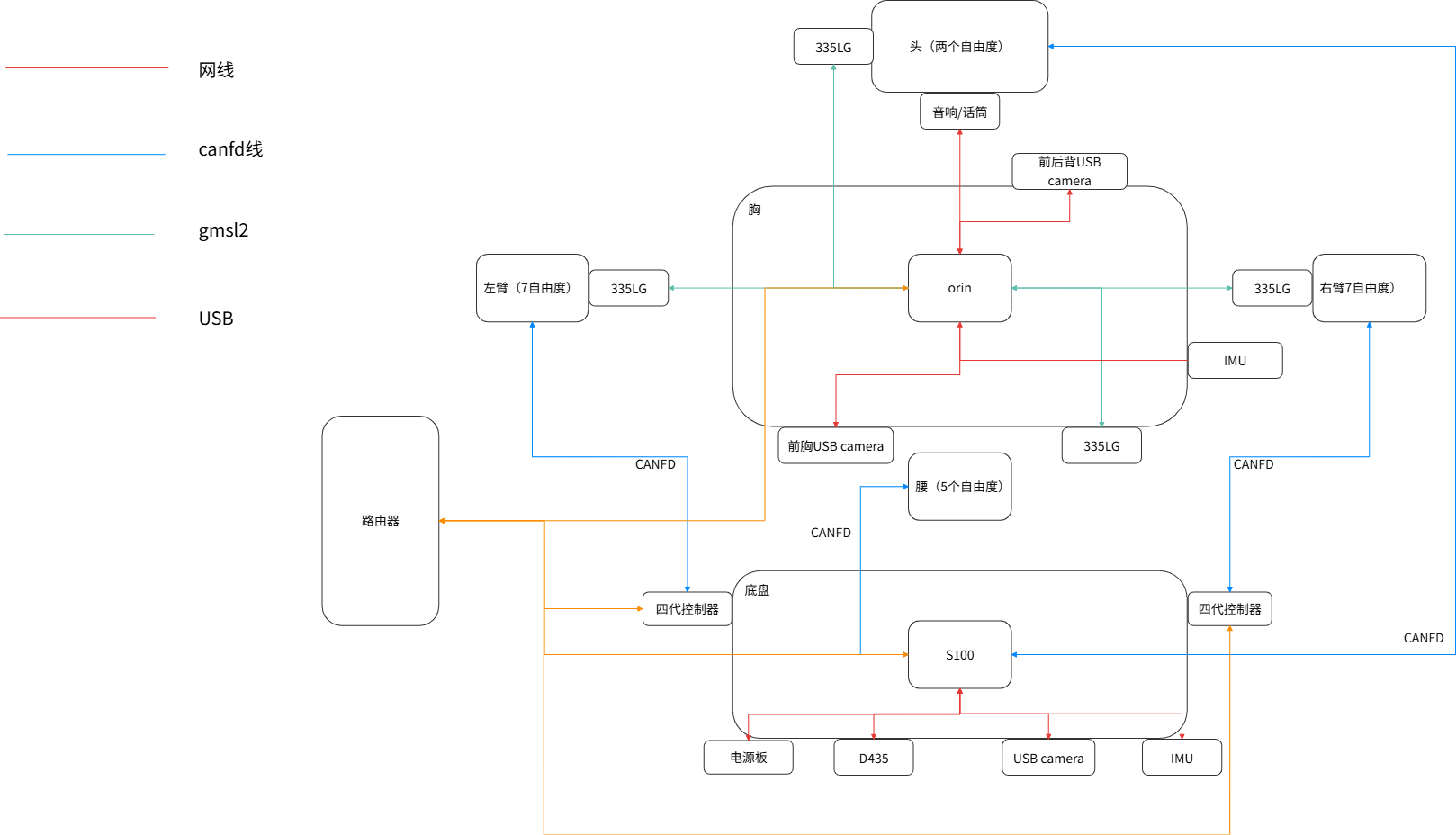
Meet RealBot-01 RealBot-01 consists of a mobile chassis, dual arms, head, waist, end-effector grippers, cameras, LiDAR, IMU, power supply system, and a two-tier computing platform.
The primary entry point for customer secondary development is the ROS 2 and REST API interfaces provided by the Orin node, eliminating the need to directly connect to underlying hardware controllers.
System Components & Development Boundaries
| System / Device | Core Responsibility | Access Boundary |
|---|---|---|
| Jetson AGX Orin Main Controller | Runs Ubuntu 22.04 LTS / ROS 2 Humble; provides high-level robot state publishing and control entry points. | Accessible via SSH login, ROS 2 Topics/Services, and local network REST APIs. |
| RDK S100 Secondary Controller | Handles data link forwarding for the mobile chassis, LiDAR, and select sensors. | Indirect access only via Orin forwarded interfaces. Direct connection for development is strictly prohibited. |
| Actuators (Dual Arms / Head / Waist / Grippers) | Executes motion commands and provides real-time feedback on joint and end-effector pose states. | This section provides read-only state access (for motion control, please refer to Robot Control). |
| Perception Sensors (Cameras / LiDAR / IMU) | Captures environmental perception and onboard system data. | Subject to the actual Topics published by the current robot model and software version. |
| Power Supply System | Manages system battery monitoring and power distribution. | The quick-start phase only supports battery status reading; power control interfaces are not exposed. |
Development Pathway Selection
Based on your secondary development environment setup, choose from the following three integration pathways:
| Development Environment | Recommended Pathway | Prerequisites |
|---|---|---|
| Robot Onboard System | Python / C++ + ROS 2 Humble | Connect via SSH and source both ROS 2 and the robot workspace environments. |
| Remote Workstation (Ubuntu 22.04) | ROS 2 Humble cross-machine subscription | 1. Connected to the same physical LAN subnet. 2. Configured with the same Domain ID. 3. Compatible RMW / custom message definitions. 4. Ensure network environment supports DDS multicast. |
| Windows / macOS / Non-ROS Linux | SSH / REST API / HTTP / Offline bag parsing | Applicable when a native ROS 2 environment matching the robot is not available by default. |