

JSON protocol:
End Effector Command set (optional) Five-fingered dexterous hand
The RealMan robotic arm is equipped with an INSPIRE-ROBOTS five-fingered dexterous hand, which can be configured by the protocol.
Set the angle follow control of the dexterous hand hand_follow_angle
Set the following angles of the dexterous hand, 6 active degrees of freedom (DOF), DOF 1 (thumb flexion), DOF 2 (index finger), DOF 3 (middle finger), DOF 4 (ring finger), DOF 5 (little finger), DOF 6 (thumb rotation). The control frequency is up to 50 Hz.
WARNING
To use this feature, you need to contact technical support for a customized firmware upgrade package for the dexterous hand (OYMotion or INSPIRE-ROBOTS).
- Input parameter
| Parameter | Type | Description |
|---|---|---|
hand_follow_angle | string | Set the finger angles. |
- The angle definitions and motion ranges for each degree of freedom of INSPIRE-ROBOTS are as follows.
| Angle | Legend | Range |
|---|---|---|
| Little finger Ring finger Middle finger Index finger | 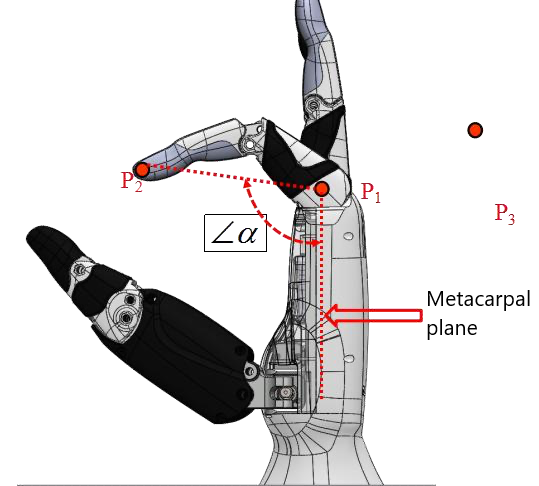 | 19°−176.7° |
| Thumb bending angle | 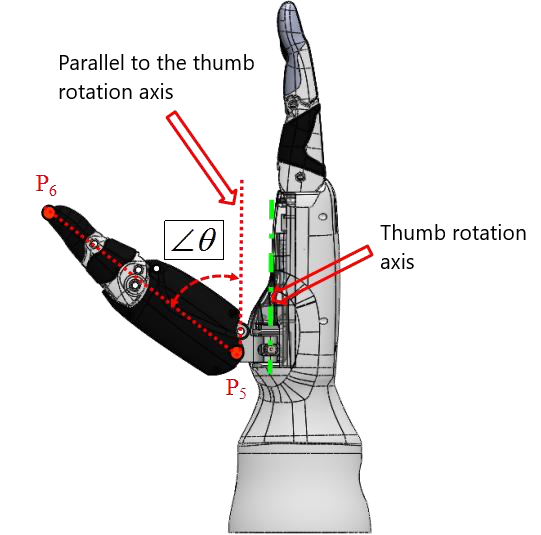 | -130−53.6° |
| Thumb rotation angle | 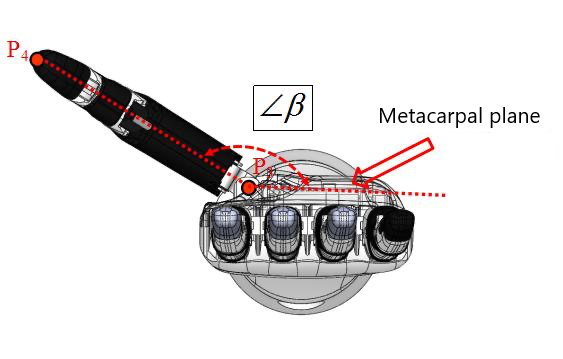 | 90°−165° |
- The angle definitions and motion ranges for each degree of freedom of OYMotion are as follows.
| Angle | Legend | Range |
|---|---|---|
| Index finger Middle finger Ring finger Little finger | 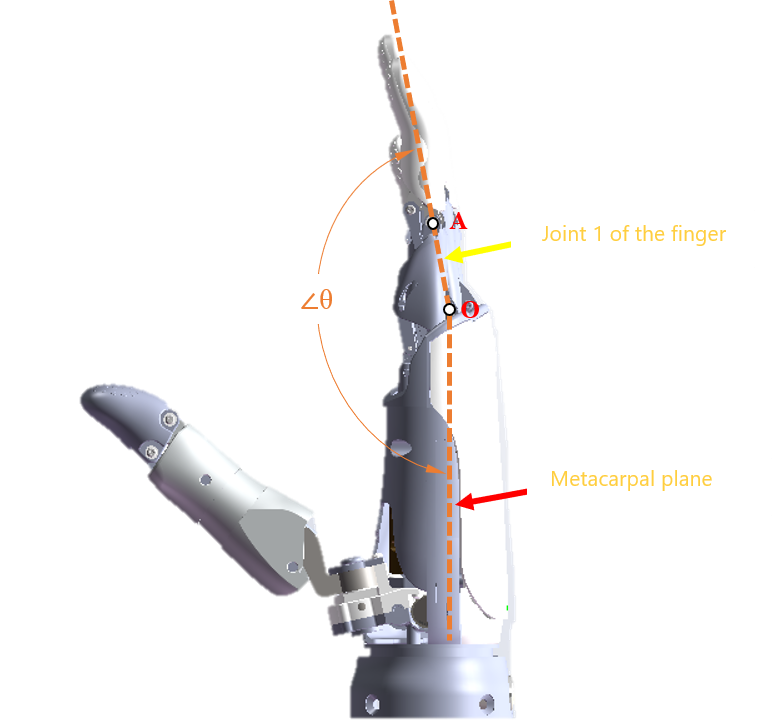 | 100.22°−178.37° 97.81°−176.06° 101.38°−176.54° 98.84°−174.86° |
| Thumb bending angle | 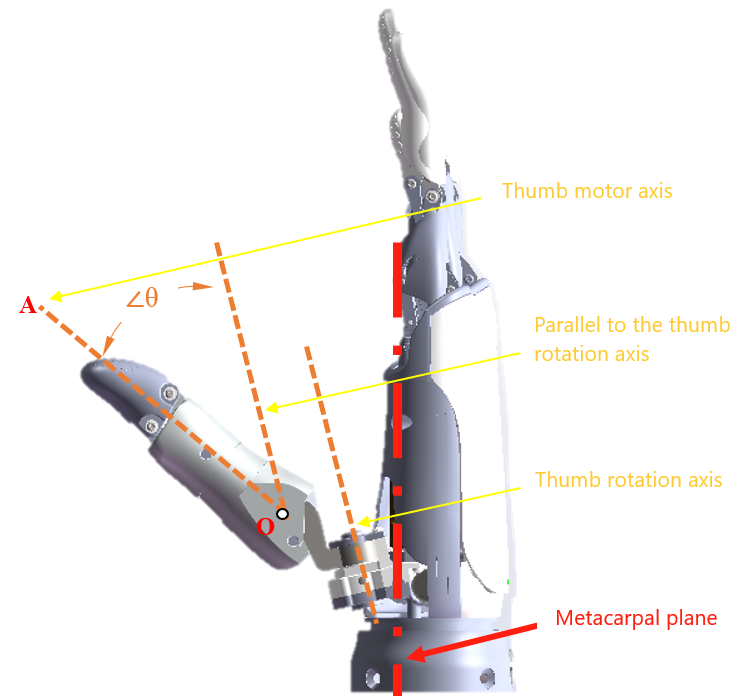 | 2.26°−36.76° |
| Thumb rotation angle | 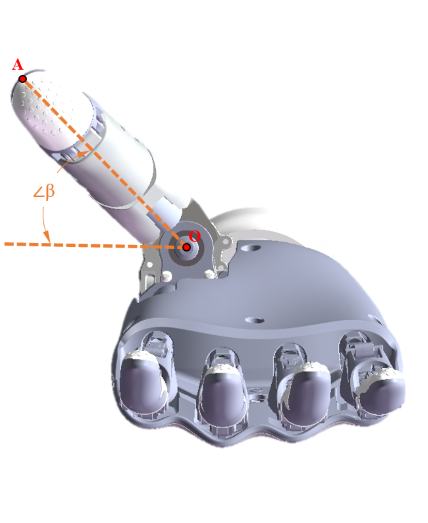 | 0°−90° |
- Code demo
Input
Execution: Set the finger actions of the dexterous hand. hand_angle: array of finger angles, controlled according to the angles defined by the manufacturer of the dexterous hand. For example:
- OYMotion has an angle range from -32,768 to +32,767;
- INSPIRE-ROBOTS has an angle range from 0 to +1,000.
Definition of angles of the dexterous hand (int16):
- OYMotion: angle of joint 1 of the first finger × 100;
- INSPIRE-ROBOTS: 0−1,000. Please contact technical support for the relationship table between the driver stroke and angle.
{"command":"hand_follow_angle","hand_angle":[100,100,200,300,400,500]}Output Setting succeeded
{
    "command": "hand_follow_angle",
    "set_state": true
}
Setting failed
{
    "command": "hand_follow_angle",
    "set_state": false
}
Set the position follow control of the dexterous hand hand_follow_pos
Set the following angles of the dexterous hand, 6 active degrees of freedom (DOF), DOF 1 (thumb flexion), DOF 2 (index finger), DOF 3 (middle finger), DOF 4 (ring finger), DOF 5 (little finger), DOF 6 (thumb rotation). The control frequency is up to 50 Hz.
WARNING
To use this feature, you need to contact technical support for a customized firmware upgrade package for the dexterous hand (OYMotion or INSPIRE-ROBOTS).
- Input parameter
| Parameter | Type | Description |
|---|---|---|
hand_follow_pos | string | Set the finger angles. |
- Code demo
Input
Execution: Set the finger actions of the dexterous hand. hand_pos: array of finger positions, controlled according to the angles defined by the manufacturer of the dexterous hand. For example:
- INSPIRE-ROBOTS has a position range from 0 to 2,000;
- OYMotion has a position range from 0 to 65,535.
{"command":"hand_follow_pos","hand_pos":[100,100,200,300,400,500]}Output Setting succeeded
{
    "command": "hand_follow_pos",
    "set_state": true
}
Setting failed
{
    "command": "hand_follow_pos",
    "set_state": false
}
End tool action list
RealMan robotic arm’s functions related to the end effector action list enable comprehensive management and control of end effector actions.
Get the end tool action listget_tool_action_list
- Input parameter
| Parameter | Type | Description |
|---|---|---|
get_tool_action_list | string | Query the action list. |
page_num | int | Page number (Do not pass this parameter when querying all). |
page_size | int | Page size (Do not pass this parameter when querying all). |
vague_search | string | Fuzzy search (Pass this parameter to perform fuzzy query). |
- Output parameter
| Parameter | Type | Description |
|---|---|---|
get_tool_action_list | string | Query the action list. |
total_size | int | Total number of actions. |
list | object | Detailed action information. |
- Code demo
Input
{"command":"get_tool_action_list"}Output
{
    "action_list": [
    {
      "hand_pos": [0, 0, 0, 0, 0, 0],
      "name": "Realman"
    },
    {
      "hand_pos": [0, 0, 0, 0, 0, 0],
      "name": "111111111111111"
    },
    {
      "hand_pos": [0, 0, 0, 0, 0, 0],
      "name": "QN-Tactile"
    },
    {
      "hand_pos": [14, 19, 18, 9, 6, 4],
      "name": "QN-Gripper Closure"
    },
    {
      "hand_pos": [14, 19, 18, 9, 6, 4],
      "name": "QN-Gripper Closure-1-1-1-1"
    },
    {
      "hand_pos": [14, 19, 18, 9, 6, 4],
      "name": "Qiangnao-Target Position"
    },
    {
      "hand_pos": [12],
      "name": "Open-1-1-1-1"
    },
    {
      "hand_pos": [12000],
      "name": "Gripper Closure-1-1-1-1"
    },
    {
      "hand_pos": [12],
      "name": "Open-1-1-1"
    },
    {
      "hand_pos": [12000],
      "name": "Gripper Closure-1-1-1"
    },
    {
      "hand_pos": [12],
      "name": "Open-1-1"
    },
    {
      "hand_pos": [12000],
      "name": "Gripper Closure-1-1"
    },
    {
      "hand_pos": [12],
      "name": "Open-1"
    },
    {
      "hand_pos": [12000],
      "name": "Gripper Closure-1"
    },
    {
      "hand_pos": [12000],
      "name": "Gripper Closure"
    },
    {
      "hand_pos": [12],
      "name": "Open"
    }
  ],
  "command": "get_tool_action_list",
  "total_size": 16
}
Run the specified end effector actionrun_tool_action
- Input parameter
| Parameter | Type | Description |
|---|---|---|
run_tool_action | string | Start running the numbered trajectory. |
name | string | Run the action with the specified name; it can run as long as the action exists. |
- Output parameter
| Parameter | Type | Description |
|---|---|---|
run_state | bool | true: Start running. false: Run failed. |
run_tool_action | string | The trajectory file runs in place. |
- Code demo
Input
Start running the action "123".
{
    "command": "run_tool_action",
    "name": "123"
}
Output
Start running succeeded.
{
    "command": "run_tool_action",
    "run_state": true
}
Start running failed.
{
    "command": "run_tool_action",
    "run_state": false
}
After the end action is completed, the operation end command is returned.
{
    "state": "current_trajectory_state",
    "trajectory_state": true,
    "device": 5,
    "trajectory_connect": 0
}
Delete the specified end effector actiondelete_tool_action
- Input parameter
| Parameter | Type | Description |
|---|---|---|
delete_tool_action | string | Delete the action with the specified name. |
name | string | The name of the action to be deleted. |
- Output parameter
| Parameter | Type | Description |
|---|---|---|
delete_state | bool | true: Succeeded. false: Failed. |
- Code demo
Input
Delete trajectory 2.
{
    "command": "delete_tool_action",
    "name": "pick"
}
Output
Deletion succeeded.
{
    "command": "delete_tool_action",
    "delete_state": true
}
Deletion failed.
{
    "command": "delete_tool_action",
    "delete_state": false
}
Save the end tool actionsave_tool_action
- Input parameter
| Parameter | Type | Description |
|---|---|---|
save_tool_action | string | Save the action. |
name | string | The name of the action to be saved. |
hand_pos | array | Position. |
hand_angle | array | Angle. |
- Output parameter
| Parameter | Type | Description |
|---|---|---|
save_state | bool | true: Succeeded. false: Failed. |
- Code demo
Input
{
    "command": "save_tool_action",
    "name": "pick",
    "hand_pos": [0, 0, 0, 0, 0, 0]
}

{
    "command": "save_tool_action",
    "name": "pick",
    "hand_angle": [0, 0, 0, 0, 0, 0]
}
Output
Saving succeeded.
{
    "command": "save_tool_action",
    "save_state": true
}
Saving failed.
{
    "command": "save_tool_action",
    "save_state": false
}
Update the end tool actionupdate_tool_action
- Input parameter
| Parameter | Type | Description |
|---|---|---|
update_tool_action | string | Update the action. |
name | string | The name of the action to be updated. |
new_name | string | New action name. |
hand_pos | array | Position. |
hand_angle | array | Angle. |
- Output parameter
| Parameter | Type | Description |
|---|---|---|
update_state | bool | true: Succeeded. false: Failed. |
- Code demo
Input
{
    "command": "update_tool_action",
    "name": "pick",
    "new_name": "1",
    "hand_pos": [0, 0, 0, 0, 0, 0]
}

{
    "command": "update_tool_action",
    "name": "pick",
    "new_name": "1",
    "hand_angle": [0, 0, 0, 0, 0, 0]
}
Output
Update succeeded.
{
    "command": "update_tool_action",
    "update_state": true
}
Update failed.
{
    "command": "update_tool_action",
    "update_state": false,
}
Trajectory end return flagcurrent_trajectory_state
The trajectory is the current trajectory.
- Input parameter
| Parameter | Type | Description |
|---|---|---|
current_trajectory_state | string | Return flag when the current trajectory ends. |
device | int | 0: Joint, 1: Gripper, 2: Dexterous Hand, 3: Lifting Mechanism, 4: Extended Joint, 5: End Tool Action, Others: Reserved. |
- Code demo
Implementation: The current trajectory reaches the target.
{
    "state": "current_trajectory_state",
    "trajectory_state": true,
    "device": 0
}