

ROS2:
Introduction to the Rm_moveit2_config Package The rm_moveit2_config package is designed for the moveit2 to control the real robotic arm and is intended to call the official moveit2 framework to generate the moveit2 configuration and launch files special for the current robotic arm in combination with the URDF of the robotic arm. Through the package, the moveit2 is used to control the virtual robotic arm and the real robotic arm.
The package will be introduced in detail from the following three aspects with different purposes:
- Package application: Learn how to use the package.
- Package structure description: Understand the composition and function of files in the package.
- Package topic description: Know the topics of the package for easy development and use.
Code link: https://github.com/RealManRobot/ros2_rm_robot/tree/humble/rm_moveit2_config
1. Application of the rm_moveit2_config package
1.1 Three Launch Scenarios
- Offline virtual controller:
ros2 launch rm_65_config demo_6fb.launch.py - Gazebo simulation: start
rm_gazebo.launch.pyfirst, and then executeros2 launch rm_65_config gazebo_moveit_demo_6fb.launch.py - Real robotic arm: start
rm_driver.launch.py,rm_description.launch.py, andrm_control.launch.pyrespectively, and then execute the correspondingreal_moveit_demo_*.launch.py
allow_trajectory_execution:=false can be set in the unified entry to keep only the planning without executing the trajectory. The new integrated structure of the 4th generation still follows the model and configuration file names of 6fb; the 6f of the 4th generation is mainly used for the identification of the new structure on the real robotic arm, while the old real_moveit_demo_6f.launch.py still refers to the original six-axis force structure.
1.2 Control of the virtual robotic arm with moveit2
After the environment configuration and connection are complete, the node can be started directly by the following command.
TIP
In the actual use, the <arm_type> in the command needs to be replaced with the actual type of the robotic arm.
The command to start the standard version of the manipulator is (Supports 65, 63, 63_III, 75, eco63, eco65, and rx75):
ros2 launch rm_<arm_type>_config demo.launch.pyThe command to start the six-axis force version of the manipulator is (Supports 63, 65, 75, and eco65):
ros2 launch rm_<arm_type>_config demo_6f.launch.pyThe command to start the integrated six-axis force version of the manipulator is (Supports 63, 63_III, 65, 75, eco63, and eco65):
ros2 launch rm_<arm_type>_config demo_6fb.launch.py
For the 65 standard version robotic arm, its start command is as follows:
ros2 launch rm_65_config demo.launch.pyAfter the node is started successfully, the following screen will pop up. 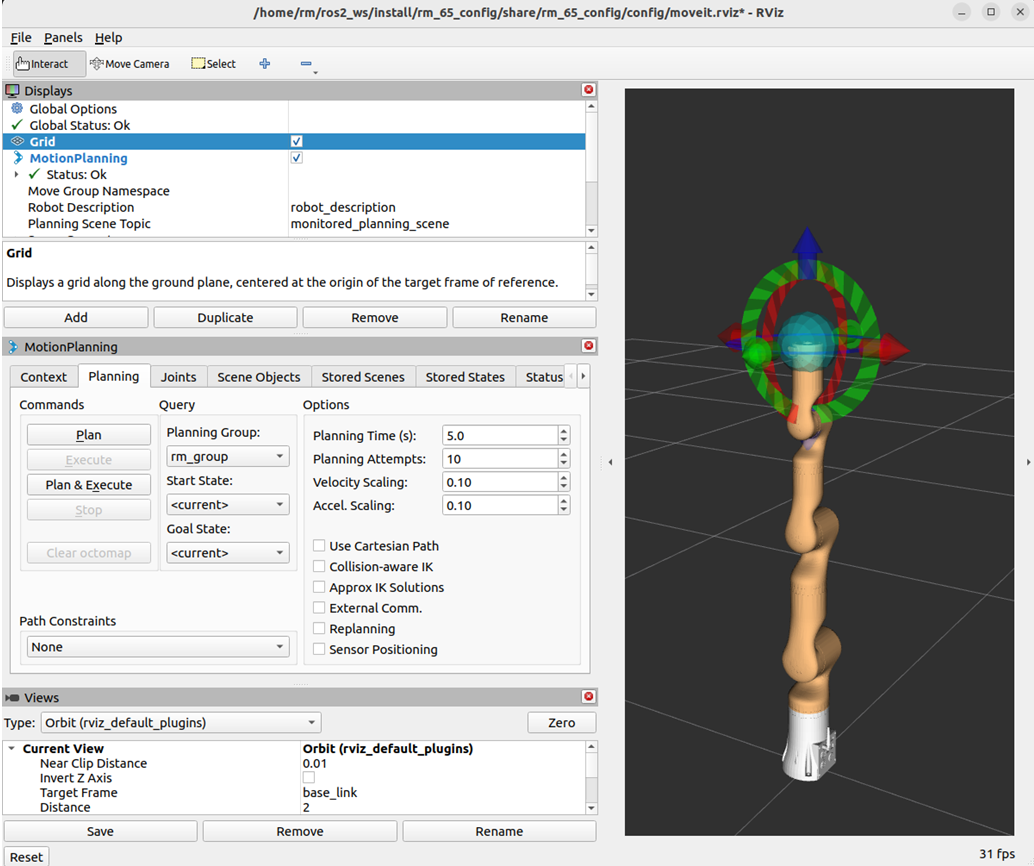 Next, drag the control ball to move the robotic arm to the target position, and then click Plan & Execute.
 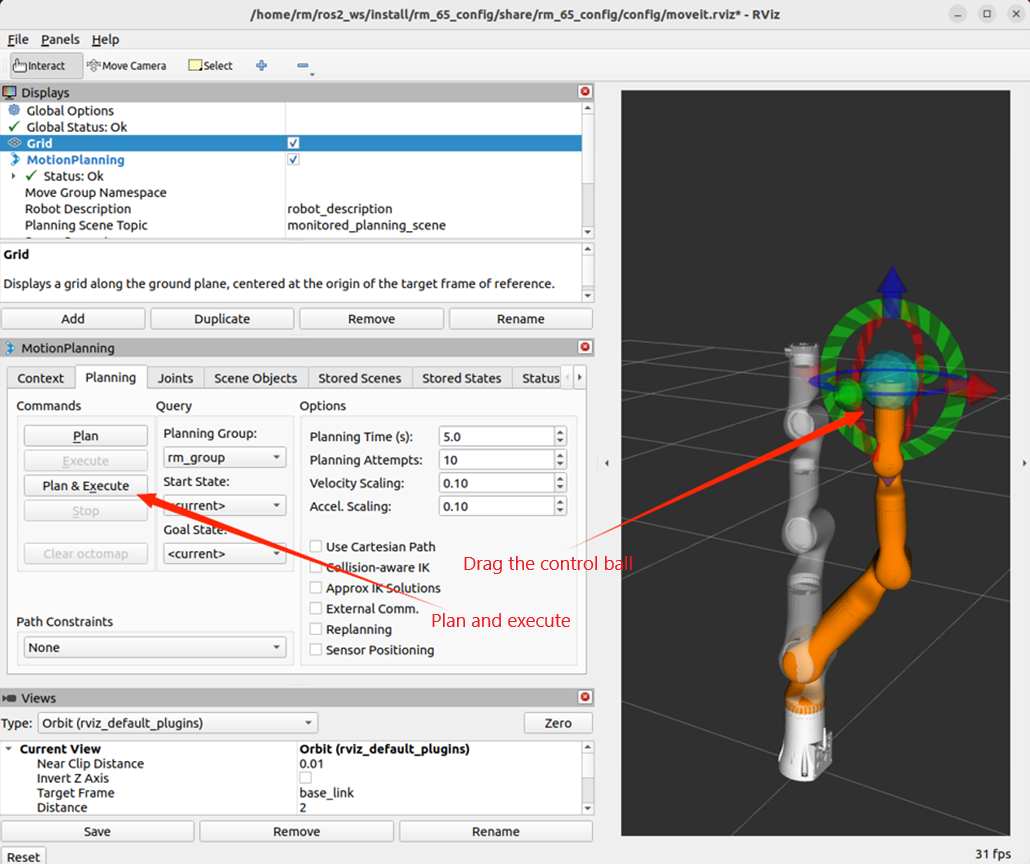 Plan and execute.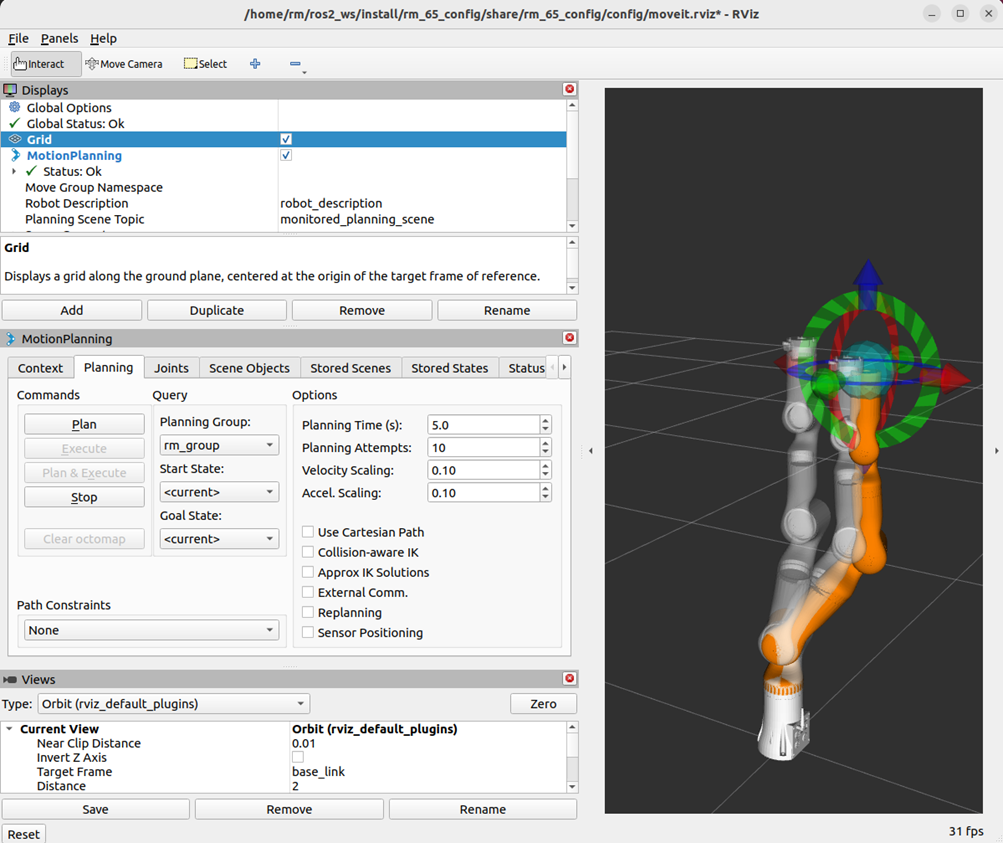
1.3 Control of the real robotic arm with moveit2
More control commands are required to control the real robotic arm, with detailed control modes as follows.
TIP
Replace <arm_type> in the command with the actual robotic arm model in practical use.
Optional models: 65, 63, 63_III, 75, eco63, eco65.
For RX75, use the dedicated launch files under
rm_rx75_config:- Run
ros2 launch rm_rx75_config real_moveit_demo_6fb_v.launch.pyfor RX75-6FB-V; - Run
ros2 launch rm_rx75_config real_moveit_demo_6fb.launch.pyfor RX75-6FB.
- Run
The newly added 63_III model is stored in its corresponding configuration file. Differentiate it by appending II or III after demo when launching.
Example launch commands for 63_III:
Standard Version B
ros2 launch rm_63_config demo_III.launch.py6-axis Force 6FB Version
ros2 launch rm_63_config demo_III_6fb.launch.py
First, run the mobile base driver node.
ros2 launch rm_driver rm_<arm_type>_driver.launch.pyNext, run the
rm_descriptionpackage file.The command to launch the standard version robotic arm is:
ros2 launch rm_description rm_<arm_type>_display.launch.pyThe command to launch the six-axis force version robotic arm is (currently supports 63, 65, 75, eco65):
ros2 launch rm_description rm_<arm_type>_6f_display.launch.pyThe command to launch the integrated six-axis force version robotic arm is (currently supports 63, 63_III, 65, 75, eco63, eco65):
ros2 launch rm_description rm_<arm_type>_6fb_display.launch.py
Then, run the related nodes of the intermediate package
rm_control.ros2 launch rm_control rm_<arm_type>_control.launch.pyFinally, start the MoveIt2 node for controlling the real robotic arm.
The command to launch the standard version robotic arm is:
ros2 launch rm_<arm_type>_config real_moveit_demo.launch.pyThe command to launch the six-axis force version robotic arm is (currently supports 63, 65, 75, eco65):
ros2 launch rm_<arm_type>_config real_moveit_demo_6f.launch.pyThe command to launch the integrated six-axis force version robotic arm is (currently supports 63, 63_III, 65, 75, eco63, eco65, rx75):
ros2 launch rm_<arm_type>_config real_moveit_demo_6fb.launch.py
After the above operations are complete, the following screen will appear, and the motion of the robotic arm is controlled by dragging the control ball. 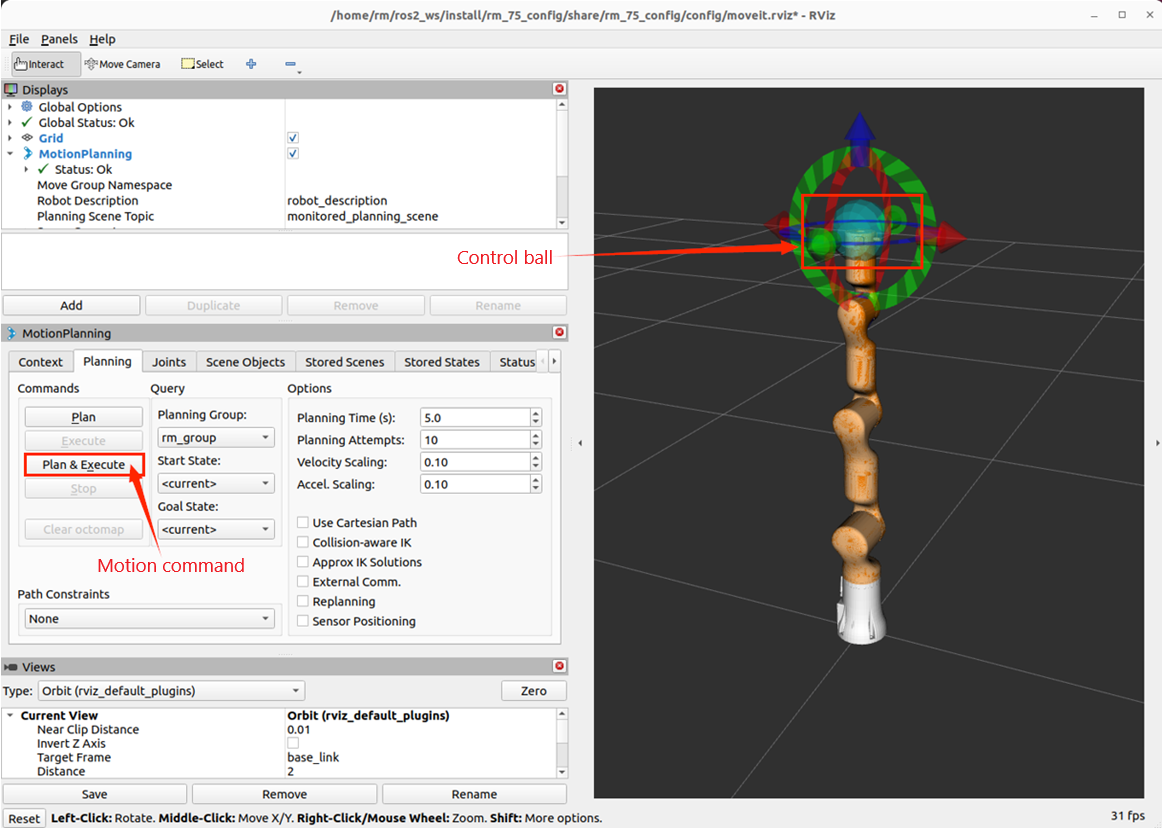
2. Structure description of the rm_moveit2_config package
├── doc
│   ├── rm_moveit2_config1.png
│   ├── rm_moveit2_config2.png
│   ├── rm_moveit2_config3.png
│   ├── rm_moveit2_config4.png
│   ├── rm_moveit2_config5.png
│   ├── rm_moveit2_config6.png
│   ├── rm_moveit2_config7.png
│   ├── rm_moveit2_config8.png
│   └── rm_moveit2_config9.png
├── README_CN.md
├── README.md
├── rm_63_config                                  # 63 Robotic Arm MoveIt2 Package
│   ├── CMakeLists.txt                            # Build rules for the 63 robotic arm MoveIt2 package
│   ├── config                                    # Parameter folder for the 63 robotic arm MoveIt2 package
│   │   ├── initial_positions.yaml                # Initial poses for the 63 robotic arm MoveIt2 package
│   │   ├── joint_limits.yaml                     # Joint limits for the 63 robotic arm
│   │   ├── kinematics.yaml                       # Kinematics parameters for the 63 robotic arm
│   │   ├── moveit_controllers.yaml               # MoveIt2 controllers for the 63 robotic arm
│   │   ├── moveit.rviz                           # RViz2 display configuration file for the 63 robotic arm
│   │   ├── pilz_cartesian_limits.yaml
│   │   ├── rml_63_description.ros2_control.xacro # Xacro description file for the 63 robotic arm
│   │   ├── rml_63_description.srdf               # MoveIt2 control configuration file for the 63 robotic arm
│   │   ├── rml_63_description.urdf.xacro         # Xacro description file for the 63 robotic arm
│   │   ├── rml_63.urdf.xacro
│   │   └── ros2_controllers.yaml                 # Motion controllers for the 63 robotic arm
│   ├── launch
│   │   ├── demo_6f.launch.py                     # MoveIt2 launch file for the 63 six-axis force virtual robotic arm
│   │   ├── demo_6fb.launch.py                    # MoveIt2 launch file for the 63 integrated six-axis force virtual robotic arm
│   │   ├── demo.launch.py                        # MoveIt2 launch file for the 63 virtual robotic arm
│   │   ├── demo_III_6fb.launch.py                # MoveIt2 launch file for the 63_III integrated six-axis force virtual robotic arm
│   │   ├── demo_III.launch.py                    # MoveIt2 launch file for the 63_III virtual robotic arm
│   │   ├── gazebo_moveit_demo_6f.launch.py       # MoveIt2 launch file for the 63 six-axis force simulated robotic arm
│   │   ├── gazebo_moveit_demo_6fb.launch.py      # MoveIt2 launch file for the 63 integrated six-axis force simulated robotic arm
│   │   ├── gazebo_moveit_demo.launch.py          # MoveIt2 launch file for the 63 simulated robotic arm
│   │   ├── gazebo_moveit_demo_III_6fb.launch.py  # MoveIt2 launch file for the 63_III integrated six-axis force simulated robotic arm
│   │   ├── gazebo_moveit_demo_III.launch.py      # MoveIt2 launch file for the 63_III simulated robotic arm
│   │   ├── move_group.launch.py
│   │   ├── moveit_rviz.launch.py
│   │   ├── real_moveit_demo_6f.launch.py         # MoveIt2 launch file for the 63 six-axis force real robotic arm
│   │   ├── real_moveit_demo_6fb.launch.py        # MoveIt2 launch file for the 63 integrated six-axis force real robotic arm
│   │   ├── real_moveit_demo.launch.py            # MoveIt2 launch file for the 63 real robotic arm
│   │   ├── real_moveit_demo_III_6fb.launch.py    # MoveIt2 launch file for the 63_III integrated six-axis force real robotic arm
│   │   ├── real_moveit_demo_III.launch.py        # MoveIt2 launch file for the 63_III real robotic arm
│   │   ├── rsp.launch.py
│   │   ├── setup_assistant.launch.py
│   │   ├── spawn_controllers.launch.py
│   │   ├── static_virtual_joint_tfs.launch.py
│   │   └── warehouse_db.launch.py
│   └── package.xml
├── rm_65_config                                  # 65 Robotic Arm MoveIt2 Package (file descriptions refer to 63)
│   ├── CMakeLists.txt
│   ├── config
│   │   ├── initial_positions.yaml
│   │   ├── joint_limits.yaml
│   │   ├── kinematics.yaml
│   │   ├── moveit_controllers.yaml
│   │   ├── moveit.rviz
│   │   ├── pilz_cartesian_limits.yaml
│   │   ├── rm_65_description.ros2_control.xacro
│   │   ├── rm_65_description.srdf
│   │   ├── rm_65_description.urdf.xacro
│   │   ├── rm_65.urdf.xacro
│   │   └── ros2_controllers.yaml
│   ├── launch
│   │   ├── demo_6f.launch.py
│   │   ├── demo_6fb.launch.py
│   │   ├── demo.launch.py
│   │   ├── gazebo_moveit_demo_6f.launch.py
│   │   ├── gazebo_moveit_demo_6fb.launch.py
│   │   ├── gazebo_moveit_demo.launch.py
│   │   ├── move_group.launch.py
│   │   ├── moveit_rviz.launch.py
│   │   ├── real_moveit_demo_6f.launch.py
│   │   ├── real_moveit_demo_6fb.launch.py
│   │   ├── real_moveit_demo.launch.py
│   │   ├── rsp.launch.py
│   │   ├── setup_assistant.launch.py
│   │   ├── spawn_controllers.launch.py
│   │   ├── static_virtual_joint_tfs.launch.py
│   │   └── warehouse_db.launch.py
│   └── package.xml
├── rm_75_config                                  # 75 Robotic Arm MoveIt2 Package (file descriptions refer to 63)
│   ├── CMakeLists.txt
│   ├── config
│   │   ├── initial_positions.yaml
│   │   ├── joint_limits.yaml
│   │   ├── kinematics.yaml
│   │   ├── moveit_controllers.yaml
│   │   ├── moveit.rviz
│   │   ├── pilz_cartesian_limits.yaml
│   │   ├── rm_75_description.ros2_control.xacro
│   │   ├── rm_75_description.srdf
│   │   ├── rm_75_description.urdf.xacro
│   │   ├── rm_75.urdf.xacro
│   │   └── ros2_controllers.yaml
│   ├── launch
│   │   ├── demo_6f.launch.py
│   │   ├── demo_6fb.launch.py
│   │   ├── demo.launch.py
│   │   ├── gazebo_moveit_demo_6f.launch.py
│   │   ├── gazebo_moveit_demo_6fb.launch.py
│   │   ├── gazebo_moveit_demo.launch.py
│   │   ├── move_group.launch.py
│   │   ├── moveit_rviz.launch.py
│   │   ├── real_moveit_demo_6f.launch.py
│   │   ├── real_moveit_demo_6fb.launch.py
│   │   ├── real_moveit_demo.launch.py
│   │   ├── rsp.launch.py
│   │   ├── setup_assistant.launch.py
│   │   ├── spawn_controllers.launch.py
│   │   ├── static_virtual_joint_tfs.launch.py
│   │   └── warehouse_db.launch.py
│   └── package.xml
├── rm_eco62_config                               # eco62 Robotic Arm MoveIt2 Package (structure and descriptions refer to 63)
├── rm_eco65_config                               # eco65 Robotic Arm MoveIt2 Package (file descriptions refer to 63)
│   ├── CMakeLists.txt
│   ├── config
│   │   ├── initial_positions.yaml
│   │   ├── joint_limits.yaml
│   │   ├── kinematics.yaml
│   │   ├── moveit_controllers.yaml
│   │   ├── moveit.rviz
│   │   ├── pilz_cartesian_limits.yaml
│   │   ├── rm_eco65_description.ros2_control.xacro
│   │   ├── rm_eco65_description.srdf
│   │   ├── rm_eco65_description.urdf.xacro
│   │   ├── rm_eco65.urdf.xacro
│   │   └── ros2_controllers.yaml
│   ├── launch
│   │   ├── demo_6f.launch.py
│   │   ├── demo_6fb.launch.py
│   │   ├── demo.launch.py
│   │   ├── gazebo_moveit_demo_6f.launch.py
│   │   ├── gazebo_moveit_demo_6fb.launch.py
│   │   ├── gazebo_moveit_demo.launch.py
│   │   ├── move_group.launch.py
│   │   ├── moveit_rviz.launch.py
│   │   ├── real_moveit_demo_6f.launch.py
│   │   ├── real_moveit_demo_6fb.launch.py
│   │   ├── real_moveit_demo.launch.py
│   │   ├── rsp.launch.py
│   │   ├── setup_assistant.launch.py
│   │   ├── spawn_controllers.launch.py
│   │   ├── static_virtual_joint_tfs.launch.py
│   │   └── warehouse_db.launch.py
│   └── package.xml
├── rm_eco63_config                               # eco63 Robotic Arm MoveIt2 Package (file descriptions refer to 63)
│   ├── CMakeLists.txt
│   ├── config
│   │   ├── initial_positions.yaml
│   │   ├── joint_limits.yaml
│   │   ├── kinematics.yaml
│   │   ├── moveit_controllers.yaml
│   │   ├── moveit.rviz
│   │   ├── pilz_cartesian_limits.yaml
│   │   ├── rm_eco63_description.ros2_control.xacro
│   │   ├── rm_eco63_description.srdf
│   │   ├── rm_eco63_description.urdf.xacro
│   │   ├── rm_eco63.urdf.xacro
│   │   └── ros2_controllers.yaml
│   ├── launch
│   │   ├── demo_6fb.launch.py
│   │   ├── demo.launch.py
│   │   ├── gazebo_moveit_demo_6fb.launch.py
│   │   ├── gazebo_moveit_demo.launch.py
│   │   ├── move_group.launch.py
│   │   ├── moveit_rviz.launch.py
│   │   ├── real_moveit_demo_6fb.launch.py
│   │   ├── real_moveit_demo.launch.py
│   │   ├── rsp.launch.py
│   │   ├── setup_assistant.launch.py
│   │   ├── spawn_controllers.launch.py
│   │   ├── static_virtual_joint_tfs.launch.py
│   │   └── warehouse_db.launch.py
│   └── package.xml
├── rm_gen72_config                               # gen72 Robotic Arm MoveIt2 Package (file descriptions refer to 63)
│   ├── CMakeLists.txt
│   ├── config
│   │   ├── initial_positions.yaml
│   │   ├── joint_limits.yaml
│   │   ├── kinematics.yaml
│   │   ├── moveit_controllers.yaml
│   │   ├── moveit.rviz
│   │   ├── pilz_cartesian_limits.yaml
│   │   ├── rm_gen72_description.ros2_control.xacro
│   │   ├── rm_gen72_description.srdf
│   │   ├── rm_gen72_description.urdf.xacro
│   │   ├── rm_gen72_II_description.urdf.xacro
│   │   └── ros2_controllers.yaml
│   ├── launch
│   │   ├── demo.launch.py
│   │   ├── demo_II.launch.py
│   │   ├── gazebo_moveit_demo.launch.py
│   │   ├── gazebo_moveit_demo_II.launch.py
│   │   ├── move_group.launch.py
│   │   ├── moveit_rviz.launch.py
│   │   ├── real_moveit_demo.launch.py
│   │   ├── real_moveit_demo_II.launch.py
│   │   ├── rsp.launch.py
│   │   ├── setup_assistant.launch.py
│   │   ├── spawn_controllers.launch.py
│   │   ├── static_virtual_joint_tfs.launch.py
│   │   └── warehouse_db.launch.py
│   └── package.xml
└── rm_rx75_config                                # RX75 dual-arm MoveIt2 package (includes planning, Gazebo, and real robotic arm launch files for RX75-6FB and RX75-6FB-V)
3. Topic description of the rm_moveit2_config package
To make the topic structure more clear, the topics of the moveit2 are reviewed and explained here in the data flow diagram. After starting the above node to control the real robotic arm, you can run the following command to check the state of the current topic:
ros2 run rqt_graph rqt_graphIf running succeeds, the following diagram will appear. 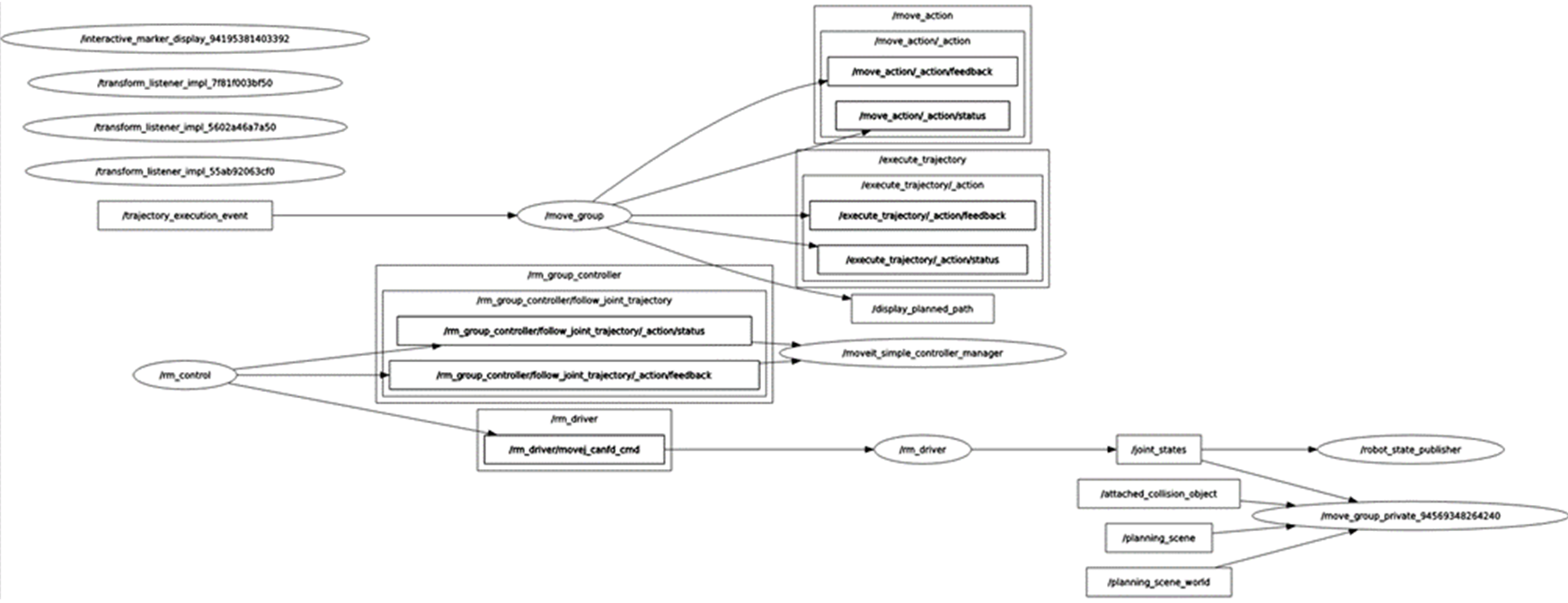 The diagram shows the topic communication between the currently running nodes and other nodes. For the /rm_driver node, it subscribes to and publishes the following topics during the moveit2 runtime.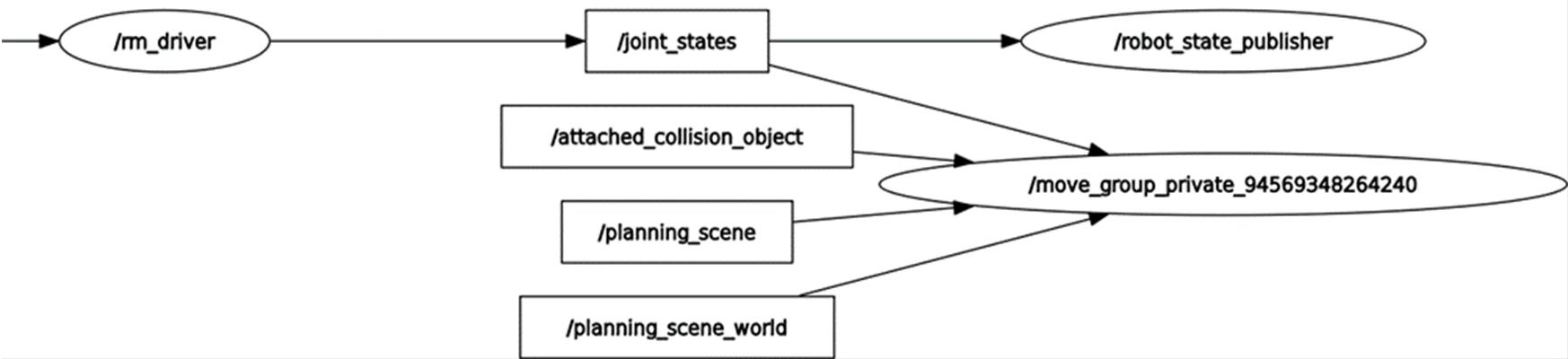
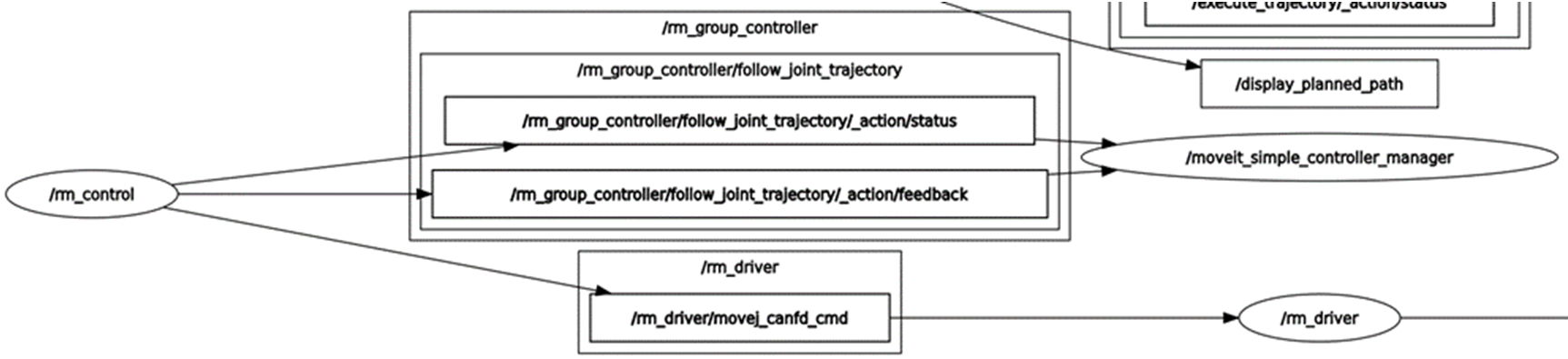 As shown in the diagram, the topic /joint_states published by the rm_driver is continuously subscribed by the /robot_state_publisher node and /move_group_private node. The /robot_state_publisher receives the /joint_states to continuously publish the TF between joints, and the /move_group_private, as a related node of the moveit2, subscribes to the topic because the moveit2 needs to get the real-time joint state of the current robotic arm during planning.
From the diagram, it can be seen that the rm_driver subscribes to the topic /rm_driver/movej_canfd_cmd of the rm_control, which is the topic of the pass-through function of the robotic arm. Through this topic, the rm_control publishes the planned joint position to the rm_driver node to control the robotic arm for motion. 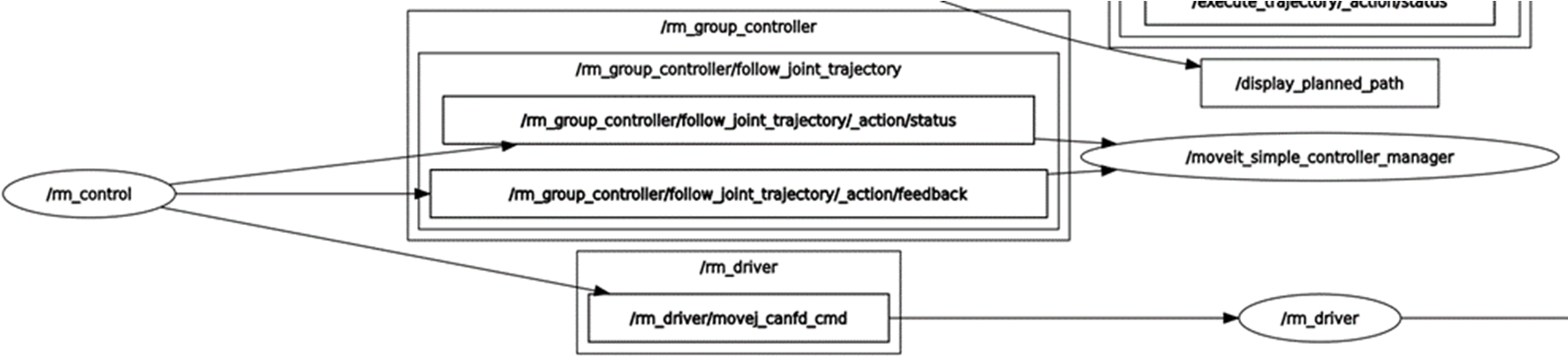 The rm_control is the communication bridge between the rm_driver and the moveit2. It communicates with the /moveit_simple_controller_manager through the /rm_group_controller/follow_joint_trajectory, gets the planned trajectory, performs interpolation operations, and sends the interpolated data to the rm_driver in a pass-through manner.
 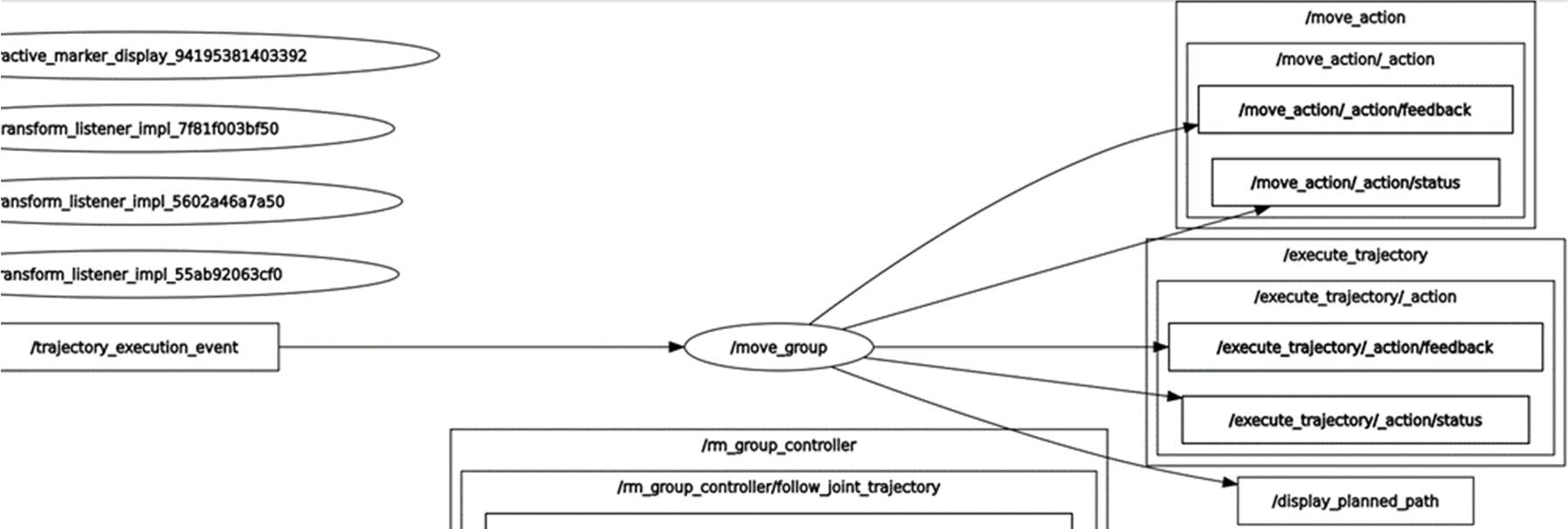 The moveit2 involves the move_group, move_group_private, and moveit_simple_controller_manager nodes, which are intended to enable the motion planning of the robotic arm, display the planning data in rviz, and pass the planning data to the rm_control for segmentation.