

JSON protocol:
End Effector Command set (optional) 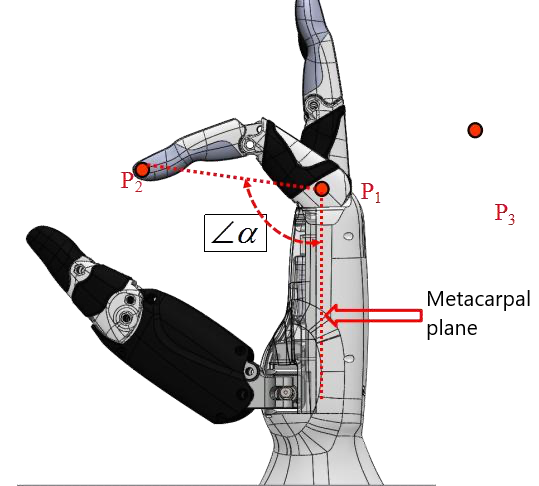
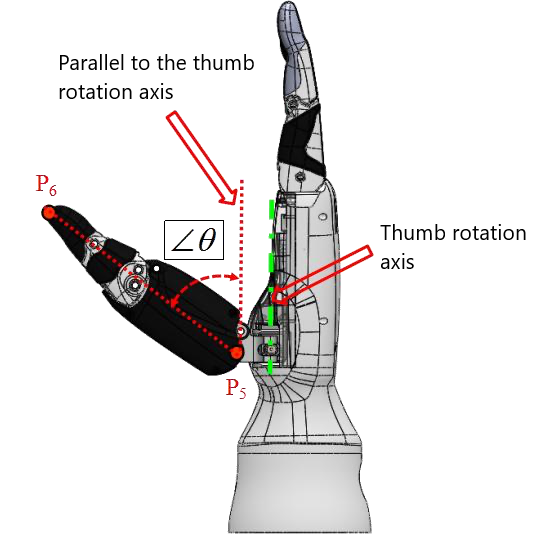
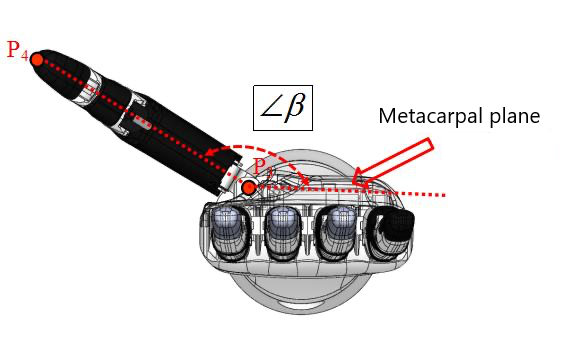
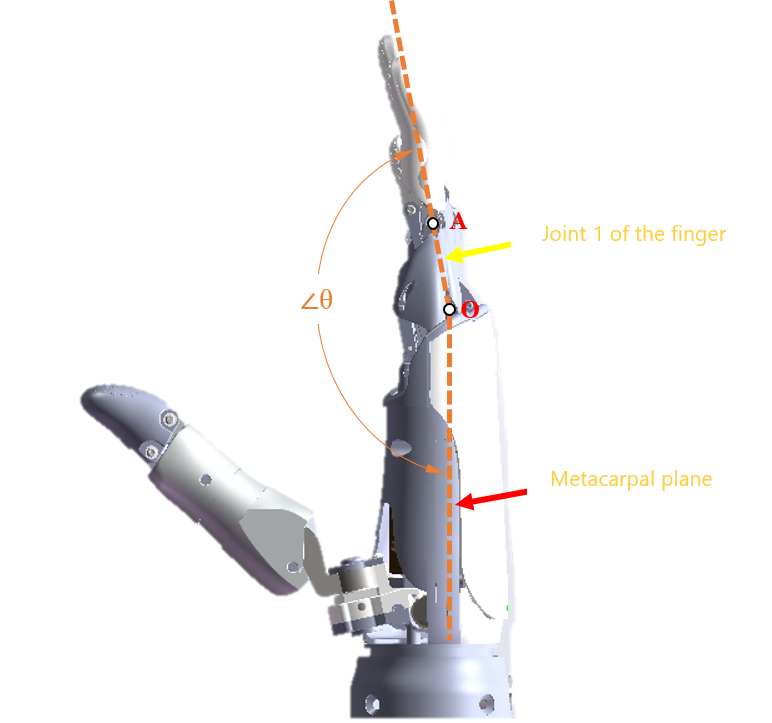
TIP
Before using the end-effector control commands, complete the following basic preparations:
- Power supply preparation: a 12V/24V output voltage must be actively configured on the end port; otherwise the end-effector has no power supply and the commands have no physical basis for execution;
- Communication preparation: the communication protocol between the end-effector and the robotic arm (baud rate, etc.) must match; otherwise the commands cannot be recognized by the end-effector.
Setting End-Effector Ecosystem Protocol Mode set_rm_plus_mode
To set the end-effector ecosystem protocol mode, the protocol must be enabled based on the interface's baud rate.
- Input Parameters
| Description | Type | Notes |
|---|---|---|
set_rm_plus_mode | string | Sets the end-effector ecosystem protocol. |
mode | int | 0 - Disable protocol; 9600 - Enable protocol (baud rate 9600); 115200 - Enable protocol (baud rate 115200); 256000 - Enable protocol (baud rate 256000); 460800 - Enable protocol (baud rate 460800). |
- Code Example
Input Set the end-effector ecosystem protocol mode.
{"command":"set_rm_plus_mode","mode":9600}Output Configuration successful:
{
"command":"set_rm_plus_mode",
"set_state":true
}Configuration failed:
{
"command": "set_rm_plus_mode",
"set_state":false
}Querying End-Effector Ecosystem Protocol Mode get_rm_plus_mode
- Input Parameters
| Description | Type | Notes |
|---|---|---|
get_rm_plus_mode | string | Retrieves the end-effector ecosystem protocol mode. |
- Output Parameters
| Description | Type | Notes |
|---|---|---|
get_rm_plus_mode | string | Retrieves the end-effector ecosystem protocol mode. |
mode | int | 0 - Disable protocol; 9600 - Enable protocol (baud rate 9600); 115200 - Enable protocol (baud rate 115200); 256000 - Enable protocol (baud rate 256000); 460800 - Enable protocol (baud rate 460800). |
- Code Example
Input Retrieve the end-effector ecosystem protocol mode.
{"command":"get_rm_plus_mode"}Output
{
"command":"get_rm_plus_mode",
"mode":9600
}Setting Tactile Sensor Mode set_rm_plus_touch
- Input Parameters
| Description | Type | Notes |
|---|---|---|
set_rm_plus_touch | string | Sets the tactile sensor switch. |
mode | int | 0 - Disable tactile sensor; 1 - Enable tactile sensor (returns processed data); 2 - Enable tactile sensor (returns raw data). |
- Code Example
Input Set the tactile sensor switch.
{"command":"set_rm_plus_touch","mode":0}Output Configuration successful:
{
"command":"set_rm_plus_touch",
"set_state":true
}Configuration failed:
{
"command":"set_rm_plus_touch",
"set_state":false
}Querying Tactile Sensor Mode get_rm_plus_touch
- Input Parameters
| Description | Type | Notes |
|---|---|---|
get_rm_plus_touch | string | Retrieves the tactile sensor mode. |
- Output Parameters
| Description | Type | Notes |
|---|---|---|
get_rm_plus_touch | string | Retrieves the tactile sensor mode. |
mode | int | 0 - Disable tactile sensor; 1 - Enable tactile sensor (returns processed data); 2 - Enable tactile sensor (returns raw data). |
- Code Example
Input Retrieve the tactile sensor mode.
{"command":"get_rm_plus_touch"}Output
{
"command":"get_rm_plus_touch",
"mode":0
}Reading Basic Information of End-Effector Device get_rm_plus_base_info
- Input Parameters
| Description | Type | Notes |
|---|---|---|
get_rm_plus_base_info | string | Reads the basic information of the end-effector device. |
- Output Parameters
| Description | Type | Notes |
|---|---|---|
get_rm_plus_base_info | string | Reads the basic information of the end-effector device. |
base_info | object | Output parameter descriptions: "manu": Device manufacturer; "type": Device type, including 1 - Two-finger gripper, 2 - Five-finger dexterous hand, 3 - Three-finger gripper; "hv": Hardware version; "sv": Software version; "bv": Bootloader version; "id": Device ID; "dof": Degrees of freedom; "check": Self-check switch; "bee": Beeper switch; "force": Force control support; "touch": Tactile support; "touch_num": Number of tactile sensors; "touch_sw": Tactile switch; "hand": Hand orientation, including 1 - Left hand, 2 - Right hand; "pos_up": Position upper limit; "pos_low": Position lower limit; "angle_up": Angle upper limit; "angle_low": Angle lower limit; "speed_up": Speed upper limit; "speed_low": Speed lower limit; "force_up": Force upper limit; "force_low": Force lower limit. |
- Code ExampleInput
Read basic information of the end-effector device.
{"command":"get_rm_plus_base_info"}Output Query successful:
{
"command":"get_rm_plus_base_info",
"base_info":{
"angle_low":[0,0,0,0,0,0],
"angle_up":[5500,7000,7000,7000,7000,9000],
"bee":0,
"bv":1286,
"check":0,
"dof":6,
"force":false,
"force_low":[0,0,0,0,0,0],
"force_up":[0,0,0,0,0,0],
"hand":1,
"hv":256,
"id":1,
"manu":"QN",
"pos_low":[0,0,0,0,0,0],
"pos_up":[100,100,100,100,100,100],
"speed_low":[0,0,0,0,0,0],
"speed_up":[100,100,100,100,100,100],
"sv":772,
"touch":true,
"touch_num":0,
"touch_sw":0,
"type":2
}
}Query failed:
{
"command":"get_rm_plus_base_info",
"get_state":false
}Reading Real-Time Information of End-Effector Device get_rm_plus_state_info
- Input Parameters
| Description | Type | Notes |
|---|---|---|
get_rm_plus_state_info | string | Reads the real-time information of the end-effector device. |
- Output Parameters
| Description | Type | Notes |
|---|---|---|
get_rm_plus_state_info | string | Reads the real-time information of the end-effector device. |
state_info | object | Output parameter descriptions: "sys_state": System status; "sys_error": System error; "dof_state": Current status of each degree of freedom (DoF); "dof_err": Error information of each DoF; "pos": Current position of each DoF; "speed": Current speed of each DoF; "angle": Current angle of each DoF; "current": Current of each DoF; "force": Torque of each DoF (not returned if force control is not supported); "normal_force": Normal force of the tactile three-dimensional force of each DoF; "tangential_force": Tangential force of the tactile three-dimensional force of each DoF; "tangential_force_dir": Direction of the tangential force of the tactile three-dimensional force of each DoF; "tsa": Tactile self-approach of each DoF; "tma": Tactile mutual approach of each DoF; "touch_data": Raw data from the tactile sensor. |
- Code ExampleInput
Read real-time information of the end-effector device.
{"command":"get_rm_plus_state_info"}Output Query successful:
{
"command":"get_rm_plus_state_info",
"state_info":{
"angle":[0,0,0,0,0,0],
"current":[0,0,0,0,0,0],
"dof_err":[0,0,0,0,0,0],
"dof_state":[0,0,0,0,0,0],
"normal_force":[65535,65535,65535,65535,65535,65535,65535,65535,65535,65535,65535,65535,65535],
"pos":[0,0,0,0,0,0],
"speed":[0,0,0,0,0,0],
"sys_state":0,
"sys_err":0,
"tangential_force":[65535,65535,65535,65535,65535,65535,65535,65535,65535,65535,65535,65535,65535],
"tangential_force_dir":[65535,65535,65535,65535,65535,65535,65535,65535,65535,65535,65535,65535,65535],
"tma":[4294967295,4294967295,4294967295],
"tsa":[4294967295,4294967295,4294967295,4294967295,4294967295,4294967295,4294967295,4294967295]
}
}Query failed:
{
"command":"get_rm_plus_state_info",
"get_state":false
}End-Effector Angle Following Control hand_follow_angle
Sets the follow angle with a maximum control frequency of 50Hz.
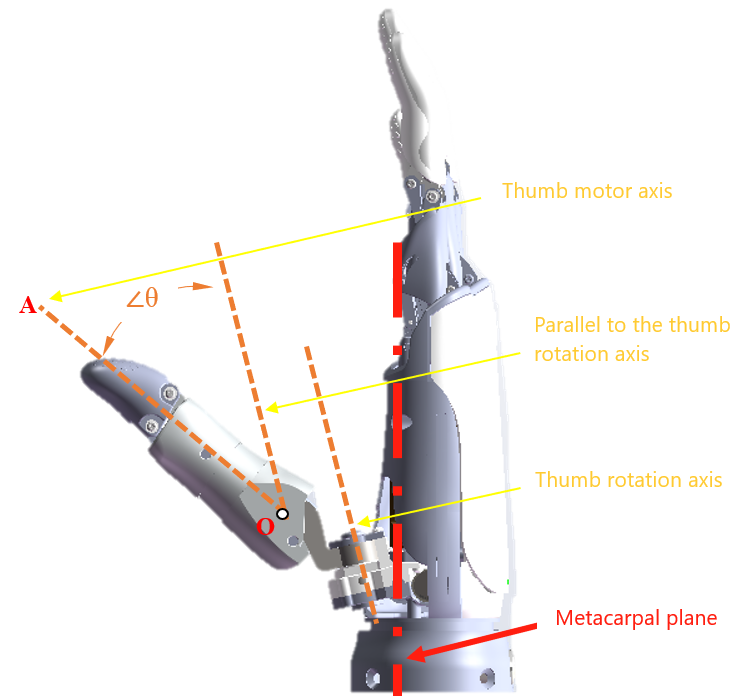
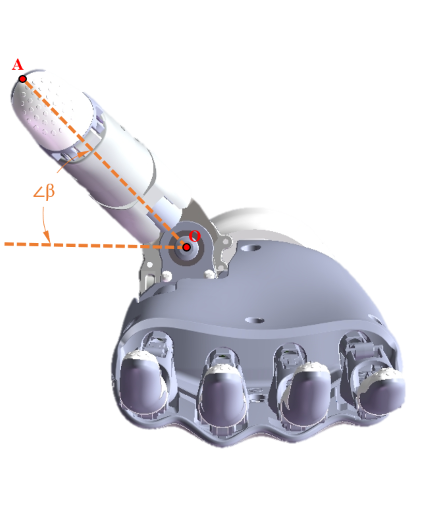
Dexterous Hand: 6 active degrees of freedom (DoF) — DoF 1 (Thumb flexion), DoF 2 (Index finger), DoF 3 (Middle finger), DoF 4 (Ring finger), DoF 5 (Little finger), DoF 6 (Thumb rotation/opponency).
2-Finger Gripper: 1 active degree of freedom (DoF).
WARNING
To use this feature, please contact technical support to obtain and flash the customized firmware upgrade package for the end-effector tool (dexterous hand/gripper).
- Input parameter
| Parameter | Type | Description |
|---|---|---|
hand_follow_angle | string | Sets the angles for the degrees of freedom. |
- Code demo
Input
{"command":"hand_follow_angle","hand_angle":[1000,1000,2000,3000,4000,5000]}INFO
When configuring individual finger movements for the dexterous hand, hand_angle represents an array of finger angles controlled according to the definitions specified by the hand manufacturer.
For example, dexterous hand angle definitions (Unit: 0.01°):
Thumb: 0 ~ 7400
Index Finger: 0 ~ 8500
Middle Finger: 0 ~ 8400
Ring Finger: 0 ~ 8500
Little Finger: 0 ~ 8400
Thumb Yaw/Rotation: 0 ~ 11000
Output
Setting succeeded
{
    "command": "hand_follow_angle",
    "set_state": true
}
Setting failed
{
    "command": "hand_follow_angle",
    "set_state": false
}End-Effector Position Following Control hand_follow_pos
Sets the follow position for the end-effector tool with a maximum control frequency of 50Hz.
Dexterous Hand: 6 active degrees of freedom (DoF) — DoF 1 (Thumb flexion), DoF 2 (Index finger), DoF 3 (Middle finger), DoF 4 (Ring finger), DoF 5 (Little finger), DoF 6 (Thumb rotation/opponency).
2-Finger Gripper: 1 active degree of freedom (DoF).
WARNING
To use this feature, please contact technical support to obtain and flash the customized firmware upgrade package for the end-effector tool (dexterous hand/gripper).
- Input parameter
| Parameter | Type | Description |
|---|---|---|
hand_follow_pos | string | Sets the positions for the degrees of freedom. |
- Code demo
Input
{"command":"hand_follow_pos","hand_pos":[10000]}INFO
When configuring the position for the 2-finger gripper, hand_pos represents an array of DoF positions controlled according to the definitions specified by the gripper manufacturer.
For example, 2-finger gripper DoF definitions:
Travel Range: 0 ~ 120mm
Actuator Stroke: 0 ~ 12000
Output Setting succeeded
{
    "command": "hand_follow_pos",
    "set_state": true
}
Setting failed
{
    "command": "hand_follow_pos",
    "set_state": false
}End-tool action management
RealMan robotic arm’s functions related to the end effector action list enable comprehensive management and control of end effector actions.
Get the end tool action listget_tool_action_list
- Input parameter
| Parameter | Type | Description |
|---|---|---|
get_tool_action_list | string | Query the action list. |
page_num | int | Page number (Do not pass this parameter when querying all). |
page_size | int | Page size (Do not pass this parameter when querying all). |
vague_search | string | Fuzzy search (Pass this parameter to perform fuzzy query). |
- Output parameter
| Parameter | Type | Description |
|---|---|---|
get_tool_action_list | string | Query the action list. |
total_size | int | Total number of actions. |
list | object | Detailed action information. |
- Code demo
Input
{"command":"get_tool_action_list"}Output
{
    "action_list": [
    {
      "hand_pos": [0, 0, 0, 0, 0, 0],
      "name": "Realman"
    },
    {
      "hand_pos": [0, 0, 0, 0, 0, 0],
      "name": "111111111111111"
    },
    {
      "hand_pos": [0, 0, 0, 0, 0, 0],
      "name": "QN-Tactile"
    },
    {
      "hand_pos": [14, 19, 18, 9, 6, 4],
      "name": "QN-Gripper Closure"
    },
    {
      "hand_pos": [14, 19, 18, 9, 6, 4],
      "name": "QN-Gripper Closure-1-1-1-1"
    },
    {
      "hand_pos": [14, 19, 18, 9, 6, 4],
      "name": "Qiangnao-Target Position"
    },
    {
      "hand_pos": [12],
      "name": "Open-1-1-1-1"
    },
    {
      "hand_pos": [12000],
      "name": "Gripper Closure-1-1-1-1"
    },
    {
      "hand_pos": [12],
      "name": "Open-1-1-1"
    },
    {
      "hand_pos": [12000],
      "name": "Gripper Closure-1-1-1"
    },
    {
      "hand_pos": [12],
      "name": "Open-1-1"
    },
    {
      "hand_pos": [12000],
      "name": "Gripper Closure-1-1"
    },
    {
      "hand_pos": [12],
      "name": "Open-1"
    },
    {
      "hand_pos": [12000],
      "name": "Gripper Closure-1"
    },
    {
      "hand_pos": [12000],
      "name": "Gripper Closure"
    },
    {
      "hand_pos": [12],
      "name": "Open"
    }
  ],
  "command": "get_tool_action_list",
  "total_size": 16
}
Run the specified end effector actionrun_tool_action
- Input parameter
| Parameter | Type | Description |
|---|---|---|
run_tool_action | string | Start running the numbered trajectory. |
name | string | Run the action with the specified name; it can run as long as the action exists. |
- Output parameter
| Parameter | Type | Description |
|---|---|---|
run_state | bool | true: Start running. false: Run failed. |
run_tool_action | string | The trajectory file runs in place. |
- Code demo
Input
Start running the action "123".
{
    "command": "run_tool_action",
    "name": "123"
}
Output
Start running succeeded.
{
    "command": "run_tool_action",
    "run_state": true
}
Start running failed.
{
    "command": "run_tool_action",
    "run_state": false
}
After the end action is completed, the operation end command is returned.
{
    "state": "current_trajectory_state",
    "trajectory_state": true,
    "device": 5,
    "trajectory_connect": 0
}
Delete the specified end effector actiondelete_tool_action
- Input parameter
| Parameter | Type | Description |
|---|---|---|
delete_tool_action | string | Delete the action with the specified name. |
name | string | The name of the action to be deleted. |
- Output parameter
| Parameter | Type | Description |
|---|---|---|
delete_state | bool | true: Succeeded. false: Failed. |
- Code demo
Input
Delete trajectory 2.
{
    "command": "delete_tool_action",
    "name": "pick"
}
Output
Deletion succeeded.
{
    "command": "delete_tool_action",
    "delete_state": true
}
Deletion failed.
{
    "command": "delete_tool_action",
    "delete_state": false
}
Save the end tool actionsave_tool_action
- Input parameter
| Parameter | Type | Description |
|---|---|---|
save_tool_action | string | Save the action. |
name | string | The name of the action to be saved. |
hand_pos | array | Position. |
hand_angle | array | Angle. |
- Output parameter
| Parameter | Type | Description |
|---|---|---|
save_state | bool | true: Succeeded. false: Failed. |
- Code demo
Input
{
    "command": "save_tool_action",
    "name": "pick",
    "hand_pos": [0, 0, 0, 0, 0, 0]
}

{
    "command": "save_tool_action",
    "name": "pick",
    "hand_angle": [0, 0, 0, 0, 0, 0]
}
Output
Saving succeeded.
{
    "command": "save_tool_action",
    "save_state": true
}
Saving failed.
{
    "command": "save_tool_action",
    "save_state": false
}
Update the end tool actionupdate_tool_action
- Input parameter
| Parameter | Type | Description |
|---|---|---|
update_tool_action | string | Update the action. |
name | string | The name of the action to be updated. |
new_name | string | New action name. |
hand_pos | array | Position. |
hand_angle | array | Angle. |
- Output parameter
| Parameter | Type | Description |
|---|---|---|
update_state | bool | true: Succeeded. false: Failed. |
- Code demo
Input
{
    "command": "update_tool_action",
    "name": "pick",
    "new_name": "1",
    "hand_pos": [0, 0, 0, 0, 0, 0]
}

{
    "command": "update_tool_action",
    "name": "pick",
    "new_name": "1",
    "hand_angle": [0, 0, 0, 0, 0, 0]
}
Output
Update succeeded.
{
    "command": "update_tool_action",
    "update_state": true
}
Update failed.
{
    "command": "update_tool_action",
    "update_state": false
}
Trajectory end return flagcurrent_trajectory_state
The trajectory is the current trajectory.
- Input parameter
| Parameter | Type | Description |
|---|---|---|
current_trajectory_state | string | Return flag when the current trajectory ends. |
device | int | 0: Joint, 1: Gripper, 2: Dexterous Hand, 3: Lifting Mechanism, 4: Extended Joint, 5: End Tool Action, Others: Reserved. |
- Code demo
Implementation: The current trajectory reaches the target.
{
    "state": "current_trajectory_state",
    "trajectory_state": true,
    "device": 0
}
End Effector Ecosystem Device Register Read-Write
Read end-effector ecosystem device registers get_rm_plus_reg
- Input parameter
| Parameter | Type | Description |
|---|---|---|
addr | int | Register start address. Note: the valid register address range is 1000~1653. |
length | int | Register length. |
- Output parameter
| Parameter | Type | Description |
|---|---|---|
plus_reg_data | int array | The register data read. |
- Code demo
Input
{"command":"get_rm_plus_reg","addr":1000,"length":11}Output
Configuration successful:
{
    "command": "get_rm_plus_reg",
    "plus_reg_data": [20814, 2, 256, 2079, 256, 1, 6, 0, 0, 32768, 1]
}
Configuration failed:
{
    "command": "get_rm_plus_reg",
    "get_state": false
}
Write end-effector ecosystem device registers set_rm_plus_reg
Follow the end-effector ecosystem protocol and implement specific functions by writing the corresponding registers.
- Input parameter
| Parameter | Type | Description |
|---|---|---|
addr | int | Register start address. Note: the valid register address range is 1000~1653. |
length | int | Register length. |
data | int array | The data to write. |
- Output parameter
| Parameter | Type | Description |
|---|---|---|
set_state | bool | true: success, false: failure. |
- Code demo
Input
Set the fingertip sensor to zero:
{"command":"set_rm_plus_reg","addr":1025,"length":1,"data":[1]}Output
Configuration successful:
{
    "command": "set_rm_plus_reg",
    "set_state": true
}
Configuration failed:
{
    "command": "set_rm_plus_reg",
    "set_state": false
}