

ROS2:
Introduction to the Rm_gazebo Package The rm_gazebo package is intended to realize the simulation of moveit2 planning for the robotic arm. A virtual robotic arm is built in the simulation environment of the gazebo and then controlled by moveit2.
The package will be introduced in detail from the following two aspects with different purposes:
- Package application: Learn how to use the package.
- Package structure description: Understand the composition and function of files in the package.
Code link: https://github.com/RealManRobot/ros2_rm_robot/tree/humble/rm_gazebo
1 Control of the virtual robotic arm
1.1 Launch the gazebo virtual space and virtual robotic arm
After the environment and package installation is complete, run the rm_gazebo package. Run the following command to launch the gazebo virtual space and virtual robotic arm.
The command to start the standard version of the manipulator is:
ros2 launch rm_gazebo gazebo_<arm_type>_demo.launch.pyThe command to start the six-axis force version of the manipulator is (current support 63, 65, 75, and eco65):
ros2 launch rm_gazebo gazebo_<arm_type>_6f_demo.launch.pyThe command to start the integrated six-axis force version of the manipulator is (current support 63, 63_III, 65, 75, eco63, eco65, rx75):
ros2 launch rm_gazebo gazebo_<arm_type>_6fb_demo.launch.pyThe command to launch the 6-axis force version robotic arm with vision solution is (current support rx75):
ros2 launch rm_description rm_<arm_type>_6fb_v_display.launch.py
Generally, the above <arm_type> is required for the actual type of the robotic arm and optional for 65, 63, 63_III, 75, eco63, eco65 and rx75.
TIP
For RX75, use gazebo_rx75_6fb_demo.launch.py to launch RX75-6FB, and use gazebo_rx75_6fb_v_demo.launch.py to launch RX75-6FB-V.
If running succeeds, the following screen will pop up. 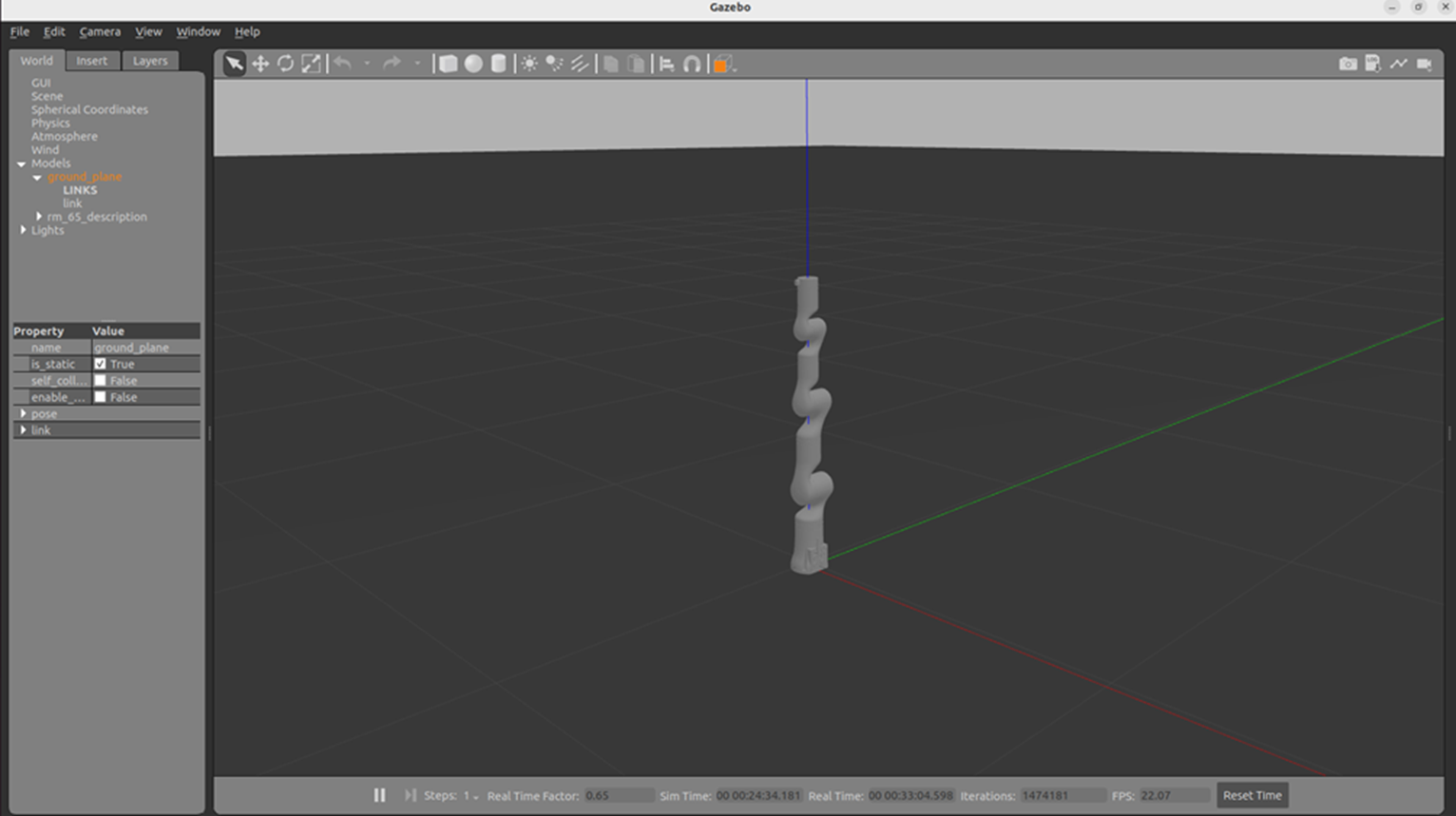
1.2 Start moveit2 to control the virtual robotic arm
Then, the following command is executed to start moveit2 to control the virtual robotic arm in the gazebo.
The command to start the standard version of the manipulator is:
ros2 launch rm_<arm_type>_config gazebo_moveit_demo.launch.pyThe command to start the six-axis force version of the manipulator is (current support 63, 65, 75, and eco65):
ros2 launch rm_<arm_type>_config gazebo_moveit_demo_6f.launch.pyThe command to start the integrated six-axis force version of the manipulator is (current support 63, 63_III, 65, 75, eco63, eco65):
ros2 launch rm_<arm_type>_config gazebo_moveit_demo_6fb.launch.py
Generally, the above <arm_type> is required for the actual type of the robotic arm and optional for 65, 63, 63_III, 75, eco63 and eco65.
TIP
RX75 uses a standalone MoveIt configuration package rm_rx75_config:
- For RX75-6FB-V, execute
ros2 launch rm_rx75_config gazebo_moveit_demo_6fb_v.launch.py - For RX75-6FB, execute
ros2 launch rm_rx75_config gazebo_moveit_demo_6fb.launch.py
The simulation control with the moveit2 and gazebo is available after the control interface of rviz2 appears. 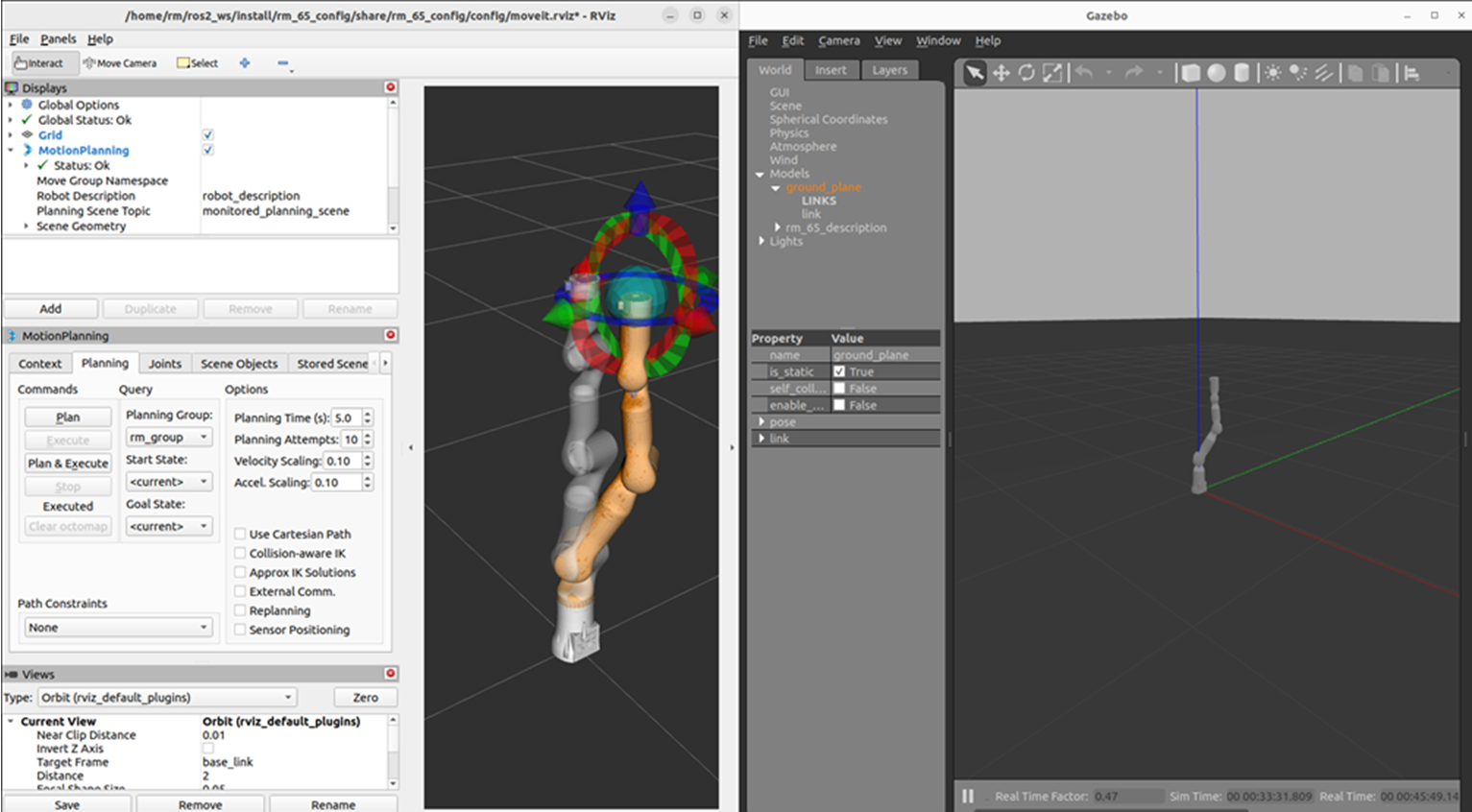
2. Structure description of the rm_gazebo package
├── CMakeLists.txt                                  # Build rule file
├── config
│   ├── gazebo_63_6fb_description.urdf.xacro        # RML63 integrated six-axis force Gazebo model description file
│   ├── gazebo_63_III_description.urdf.xacro        # RML63_III integrated six-axis force Gazebo model description file
│   ├── gazebo_65_6fb_description.urdf.xacro        # RM65 integrated six-axis force Gazebo model description file
│   ├── gazebo_75_6fb_description.urdf.xacro        # RM75 integrated six-axis force Gazebo model description file
│   ├── gazebo_eco63_6fb_description.urdf.xacro     # ECO63 integrated six-axis force Gazebo model description file
│   ├── gazebo_eco65_6fb_description.urdf.xacro     # ECO65 integrated six-axis force Gazebo model description file
│   ├── gazebo_63_description.urdf.xacro            # RML63 Gazebo model description file
│   ├── gazebo_65_description.urdf.xacro            # RM65 Gazebo model description file
│   ├── gazebo_75_description.urdf.xacro            # RM75 Gazebo model description file
│   ├── gazebo_eco65_description.urdf.xacro         # ECO65 Gazebo model description file
│   ├── gazebo_eco63_description.urdf.xacro         # ECO63 Gazebo model description file
│   ├── gazebo_gen72_description.urdf.xacro         # GEN72 Gazebo model description file
│   ├── gazebo_gen72_II_description.urdf.xacro      # GEN72_II Gazebo model description file
│   ├── gazebo_rx75_6fb_description.urdf.xacro      # RX75-6FB dual-arm Gazebo model description file
│   ├── gazebo_rx75_6fb_v_description.urdf.xacro    # RX75-6FB-V dual-arm Gazebo model description file
│   └── gazebo_rx75_description.urdf.xacro          # RX75 dual-arm Gazebo auxiliary description file
├── doc
│   ├── rm_gazebo1.png
│   └── rm_gazebo2.png
├── include
│   └── rm_gazebo
├── launch
│   ├── gazebo_63_6fb_demo.launch.py       # RML63 integrated six-axis force Gazebo launch file
│   ├── gazebo_63_6f_demo.launch.py        # RML63 six-axis force Gazebo launch file
│   ├── gazebo_63_demo.launch.py           # RML63 Gazebo launch file
│   ├── gazebo_63_III_6fb_demo.launch.py   # RML63_III integrated six-axis force Gazebo launch file
│   ├── gazebo_63_III_demo.launch.py       # RML63_III Gazebo launch file
│   ├── gazebo_65_6fb_demo.launch.py       # RM65 integrated six-axis force Gazebo launch file
│   ├── gazebo_65_6f_demo.launch.py        # RM65 six-axis force Gazebo launch file
│   ├── gazebo_65_demo.launch.py           # RM65 Gazebo launch file
│   ├── gazebo_75_6fb_demo.launch.py       # RM75 integrated six-axis force Gazebo launch file
│   ├── gazebo_75_6f_demo.launch.py        # RM75 six-axis force Gazebo launch file
│   ├── gazebo_75_demo.launch.py           # RM75 Gazebo launch file
│   ├── gazebo_eco63_6fb_demo.launch.py    # ECO63 integrated six-axis force Gazebo launch file
│   ├── gazebo_eco63_demo.launch.py        # ECO63 Gazebo launch file
│   ├── gazebo_eco65_6fb_demo.launch.py    # ECO65 integrated six-axis force Gazebo launch file
│   ├── gazebo_eco65_6f_demo.launch.py     # ECO65 six-axis force Gazebo launch file
│   ├── gazebo_eco65_demo.launch.py        # ECO65 Gazebo launch file
│   ├── gazebo_gen72_demo.launch.py        # GEN72 Gazebo launch file
│   ├── gazebo_gen72_II_demo.launch.py     # GEN72_II Gazebo launch file
│   ├── gazebo_rx75_6fb_demo.launch.py     # RX75-6FB dual-arm Gazebo launch file
│   ├── gazebo_rx75_6fb_v_demo.launch.py   # RX75-6FB-V dual-arm Gazebo launch file
│   └── gz_demo_common.py                  # Gazebo common launch helper script
├── package.xml
├── README_CN.md
└── README.md